> ## Documentation Index
> Fetch the complete documentation index at: https://docs.myfundingmachine.com/llms.txt
> Use this file to discover all available pages before exploring further.

# How to Clone an Affiliate Campaign

> Duplicate an existing campaign's configuration to launch a new one quickly and keep your settings consistent.

# How to Clone an Affiliate Campaign

Cloning reuses an existing campaign's configuration so you can launch a new one without rebuilding it.

1. In **Marketing → Affiliate Manager**, open the **Campaign** tab.
<Frame>
  <img src="https://mintcdn.com/fundingmachine-b7281907/HVlxENosbv4ELwno/images/affiliate-manager/how-to-clone-an-affiliate-campaign/01.png?fit=max&auto=format&n=HVlxENosbv4ELwno&q=85&s=328984c1bb7b308a0cc9011f74005831" alt="How It Works in the Affiliate Manager" width="1613" height="731" data-path="images/affiliate-manager/how-to-clone-an-affiliate-campaign/01.png" />
</Frame>

2. Click the three dots on the campaign you want to clone and select **Clone Campaign**.
<Frame>
  <img src="https://mintcdn.com/fundingmachine-b7281907/HVlxENosbv4ELwno/images/affiliate-manager/how-to-clone-an-affiliate-campaign/02.png?fit=max&auto=format&n=HVlxENosbv4ELwno&q=85&s=e0c404001b7e262c539b62e023798d0e" alt="How It Works in the Affiliate Manager (2)" width="1586" height="641" data-path="images/affiliate-manager/how-to-clone-an-affiliate-campaign/02.png" />
</Frame>

3. Name the cloned campaign.

<Frame>
  <img src="https://mintcdn.com/fundingmachine-b7281907/HVlxENosbv4ELwno/images/affiliate-manager/how-to-clone-an-affiliate-campaign/03.png?fit=max&auto=format&n=HVlxENosbv4ELwno&q=85&s=cf22eb3bd16100f9ab8b643193948a2c" alt="How It Works in the Affiliate Manager (3)" width="684" height="560" data-path="images/affiliate-manager/how-to-clone-an-affiliate-campaign/03.png" />
</Frame>

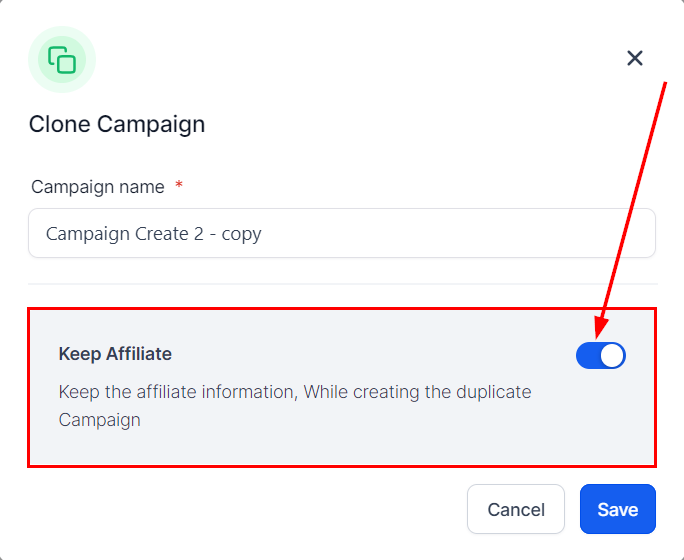
4. Choose whether to keep the original campaign's partners or start fresh.
<Frame>
  <img src="https://mintcdn.com/fundingmachine-b7281907/HVlxENosbv4ELwno/images/affiliate-manager/how-to-clone-an-affiliate-campaign/04.png?fit=max&auto=format&n=HVlxENosbv4ELwno&q=85&s=d44b346fe7d8ae7ab4719e1e4a2b541e" alt="How It Works in the Affiliate Manager (4)" width="684" height="560" data-path="images/affiliate-manager/how-to-clone-an-affiliate-campaign/04.png" />
</Frame>

5. Click **Save**.

<Frame>
  <img src="https://mintcdn.com/fundingmachine-b7281907/HVlxENosbv4ELwno/images/affiliate-manager/how-to-clone-an-affiliate-campaign/05.png?fit=max&auto=format&n=HVlxENosbv4ELwno&q=85&s=49d7699f1d39a0e828ecf9e9ecc40cdf" alt="How It Works in the Affiliate Manager (5)" width="684" height="560" data-path="images/affiliate-manager/how-to-clone-an-affiliate-campaign/05.png" />
</Frame>

<Note>
  The clone is inactive by default, so you can adjust settings before publishing it.
</Note>