> ## Documentation Index
> Fetch the complete documentation index at: https://docs.myfundingmachine.com/llms.txt
> Use this file to discover all available pages before exploring further.

# How to Manage Customers Under Partners

> Disable, re-enable, move, or remove a customer attributed to a partner, and delete a denied commission.

# How to Manage Customers Under Partners

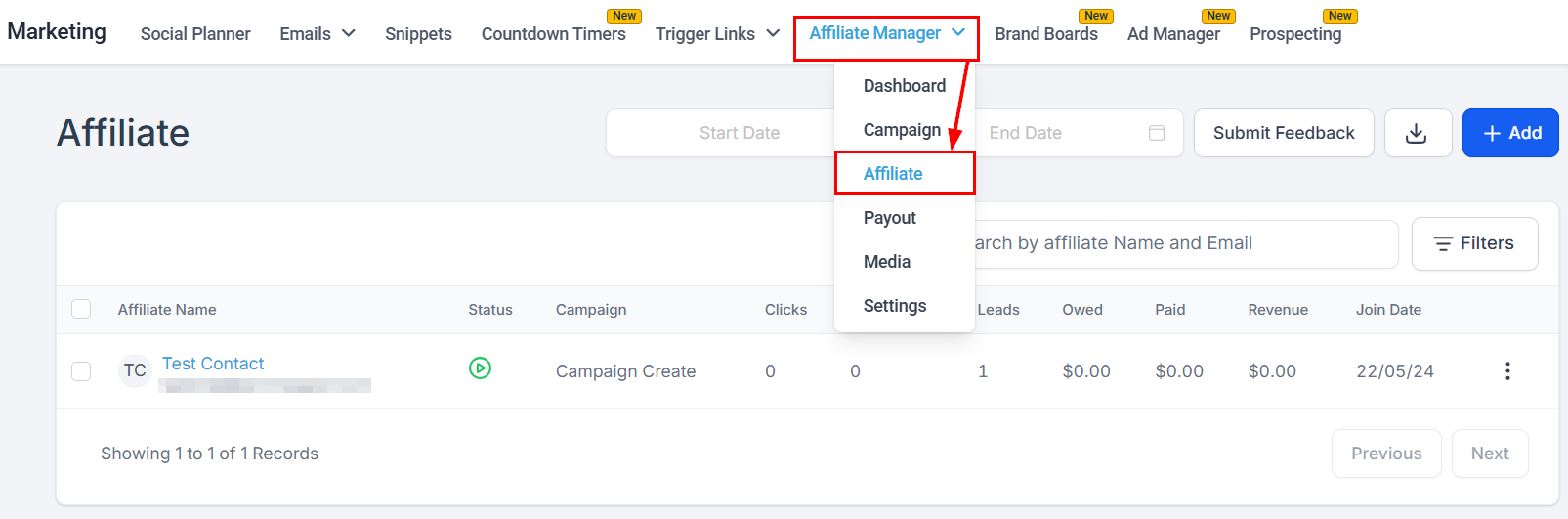
Disable, re-enable, move, or remove a customer attributed to a partner, and delete commissions that need correcting. Start in the **Affiliates** section of the Affiliate Manager.
<Frame>
  <img src="https://mintcdn.com/fundingmachine-b7281907/HVlxENosbv4ELwno/images/affiliate-manager/how-to-manage-customers-under-affiliates/01.png?fit=max&auto=format&n=HVlxENosbv4ELwno&q=85&s=6f5605dc6e7dcc300e86eaf830ffcc2c" alt="How to Manage Customers Under Affiliates in the Affiliate Manager" width="1605" height="531" data-path="images/affiliate-manager/how-to-manage-customers-under-affiliates/01.png" />
</Frame>

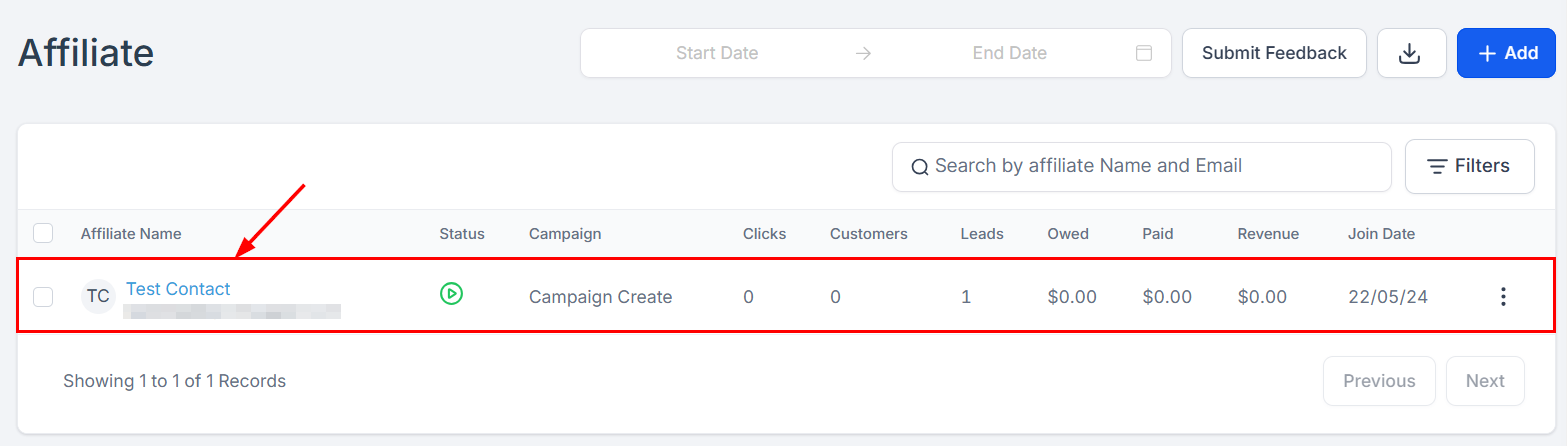
Open the partner's profile by clicking their name.
<Frame>
  <img src="https://mintcdn.com/fundingmachine-b7281907/HVlxENosbv4ELwno/images/affiliate-manager/how-to-manage-customers-under-affiliates/02.png?fit=max&auto=format&n=HVlxENosbv4ELwno&q=85&s=f58fcbce5fefeecc9d1807e9c49f8209" alt="How to Manage Customers Under Affiliates in the Affiliate Manager (2)" width="1567" height="446" data-path="images/affiliate-manager/how-to-manage-customers-under-affiliates/02.png" />
</Frame>

## Disable or enable a customer

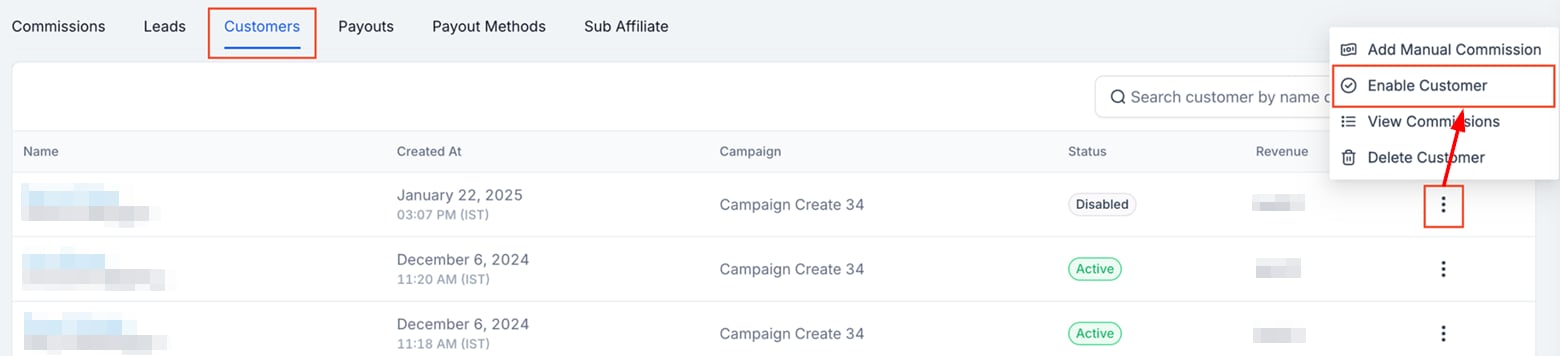
In the **Customers** tab, find the customer (search or filter), click the three dots next to their name, select **Disable Customer** or **Enable Customer**, and confirm.
<Frame>
  <img src="https://mintcdn.com/fundingmachine-b7281907/HVlxENosbv4ELwno/images/affiliate-manager/how-to-manage-customers-under-affiliates/03.png?fit=max&auto=format&n=HVlxENosbv4ELwno&q=85&s=bc834ff46fcfb391991a6e2de970dada" alt="Disabling/Enabling a Customer in the Affiliate Manager" width="1560" height="356" data-path="images/affiliate-manager/how-to-manage-customers-under-affiliates/03.png" />
</Frame>

A disabled customer shows status "Disabled" and generates no further commissions. Re-enable them the same way with **Enable Customer**.

## Move or remove a customer

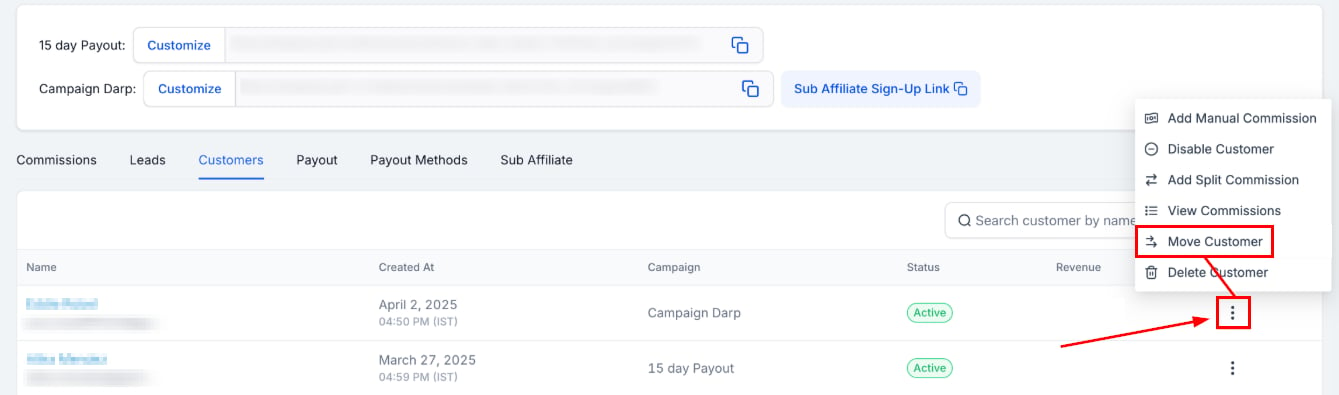
To re-assign a customer to a different partner, click **Move Customer**.
<Frame>
  <img src="https://mintcdn.com/fundingmachine-b7281907/HVlxENosbv4ELwno/images/affiliate-manager/how-to-manage-customers-under-affiliates/04.png?fit=max&auto=format&n=HVlxENosbv4ELwno&q=85&s=fa72885477570eecb706dafd8857816e" alt="Removing a Customer from an Affiliate in the Affiliate Manager" width="1339" height="395" data-path="images/affiliate-manager/how-to-manage-customers-under-affiliates/04.png" />
</Frame>

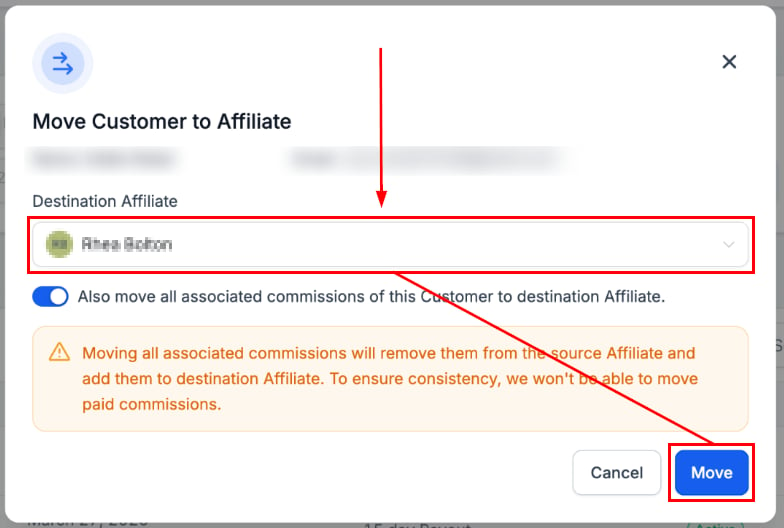
Select the new partner and click move.
<Frame>
  <img src="https://mintcdn.com/fundingmachine-b7281907/HVlxENosbv4ELwno/images/affiliate-manager/how-to-manage-customers-under-affiliates/05.png?fit=max&auto=format&n=HVlxENosbv4ELwno&q=85&s=a88cdd38f7b73f49ed2c6a636a266ab7" alt="Removing a Customer from an Affiliate in the Affiliate Manager (2)" width="784" height="528" data-path="images/affiliate-manager/how-to-manage-customers-under-affiliates/05.png" />
</Frame>

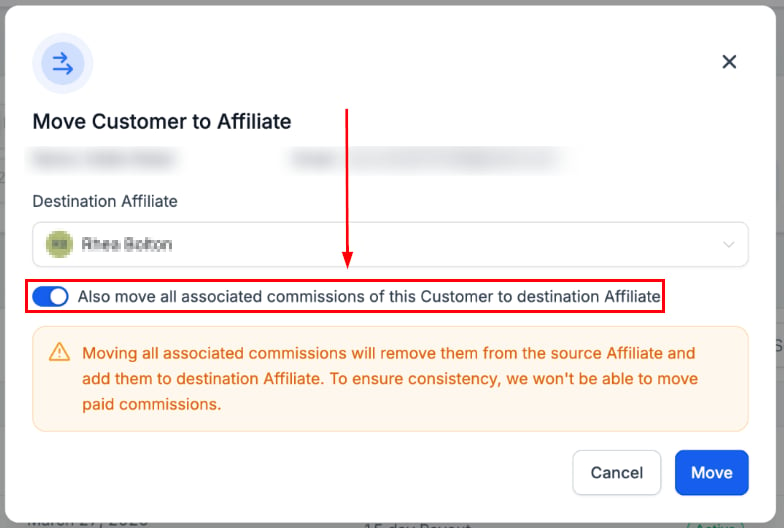
Toggle this option to transfer the associated commissions as well.
<Frame>
  <img src="https://mintcdn.com/fundingmachine-b7281907/HVlxENosbv4ELwno/images/affiliate-manager/how-to-manage-customers-under-affiliates/06.png?fit=max&auto=format&n=HVlxENosbv4ELwno&q=85&s=63a2b6aacfabff918ae31a08e450c8be" alt="Removing a Customer from an Affiliate in the Affiliate Manager (3)" width="784" height="528" data-path="images/affiliate-manager/how-to-manage-customers-under-affiliates/06.png" />
</Frame>

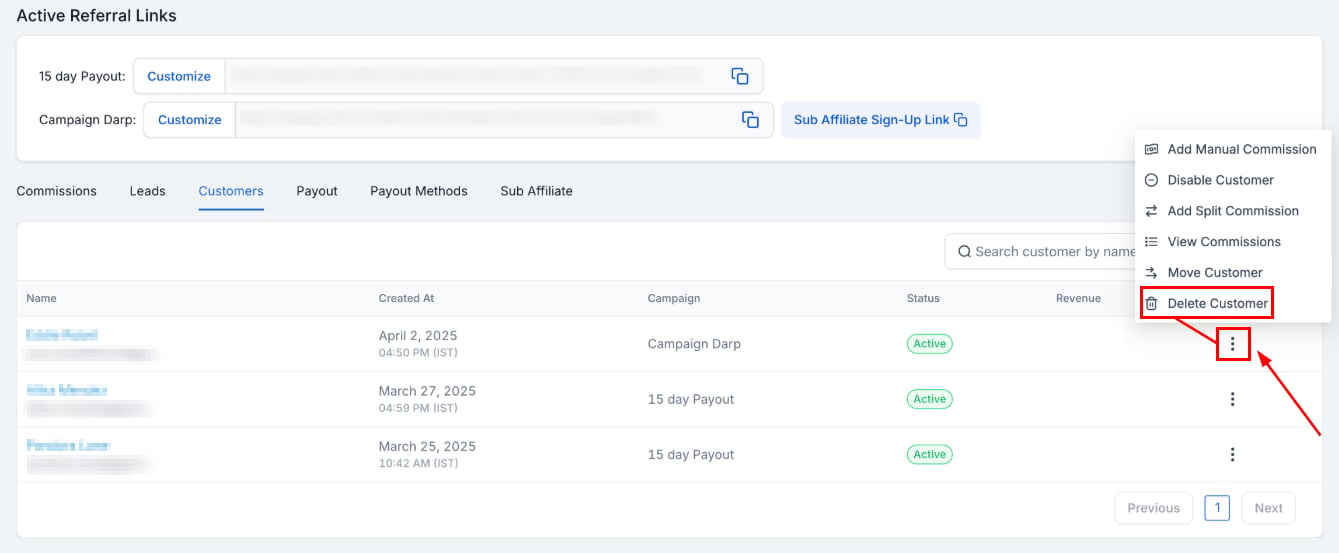
To remove the customer entirely, click **Delete** in the customer's actions menu and confirm. The customer is unlinked from the partner and generates no future commissions.
<Frame>
  <img src="https://mintcdn.com/fundingmachine-b7281907/HVlxENosbv4ELwno/images/affiliate-manager/how-to-manage-customers-under-affiliates/07.png?fit=max&auto=format&n=HVlxENosbv4ELwno&q=85&s=507173cf45cf1ef95896cd966dd170b0" alt="Removing a Customer from an Affiliate in the Affiliate Manager (4)" width="1339" height="553" data-path="images/affiliate-manager/how-to-manage-customers-under-affiliates/07.png" />
</Frame>

## Delete a commission

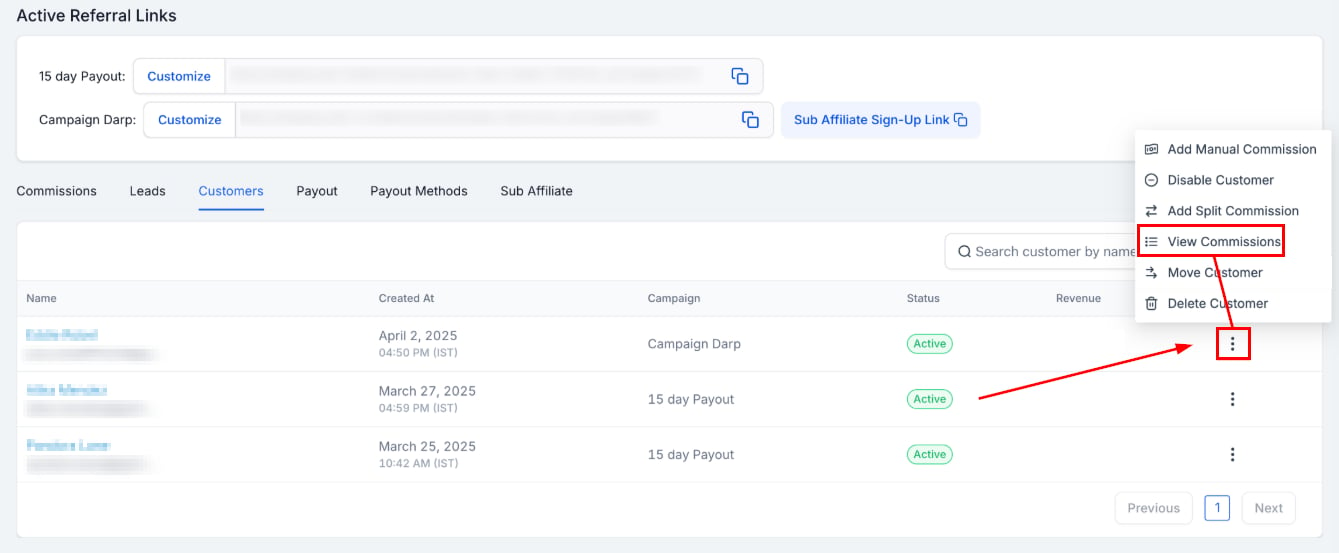
To correct a commission, first view the commissions associated with the customer.
<Frame>
  <img src="https://mintcdn.com/fundingmachine-b7281907/HVlxENosbv4ELwno/images/affiliate-manager/how-to-manage-customers-under-affiliates/08.png?fit=max&auto=format&n=HVlxENosbv4ELwno&q=85&s=775e8d5945595a6c4d49432f32fa5e56" alt="Deleting Commissions in the Affiliate Manager" width="1339" height="553" data-path="images/affiliate-manager/how-to-manage-customers-under-affiliates/08.png" />
</Frame>

In the **Commissions** tab, locate the commission to delete.

<Note>
  Only denied commissions can be deleted — deny the commission first if needed.

</Note>

<Frame>
  <img src="https://mintcdn.com/fundingmachine-b7281907/HVlxENosbv4ELwno/images/affiliate-manager/how-to-manage-customers-under-affiliates/09.png?fit=max&auto=format&n=HVlxENosbv4ELwno&q=85&s=7cbd0cf9aa3644a8b2af6a0039f4f6b3" alt="Deleting Commissions in the Affiliate Manager (2)" width="1800" height="343" data-path="images/affiliate-manager/how-to-manage-customers-under-affiliates/09.png" />
</Frame>

After denying it, click the three dots next to the commission, select **Delete**, and confirm.

<Frame>
  <img src="https://mintcdn.com/fundingmachine-b7281907/HVlxENosbv4ELwno/images/affiliate-manager/how-to-manage-customers-under-affiliates/10.png?fit=max&auto=format&n=HVlxENosbv4ELwno&q=85&s=a69c0fed12f0129e032efb1f5edd2f01" alt="Deleting Commissions in the Affiliate Manager (3)" width="1778" height="340" data-path="images/affiliate-manager/how-to-manage-customers-under-affiliates/10.png" />
</Frame>
