> ## Documentation Index
> Fetch the complete documentation index at: https://docs.myfundingmachine.com/llms.txt
> Use this file to discover all available pages before exploring further.

# How to Pay Partners for Lead Generation Using Pay-Per-Lead

> Build a campaign that pays partners a fixed amount for every lead they refer, rather than only on closed sales.

# How to Pay Partners for Lead Generation Using Pay-Per-Lead

Pay-Per-Lead (PPL) pays partners for each lead they refer — a form submission, calendar booking, or survey submission — instead of only on closed sales. Per-lead commissions are usually small (as little as \$0.01), and partners tend to generate far more leads than sales, so watch total cost when the bar for a "lead" is low. For the sale-based alternative, see [Pay-per-sale](/operators/affiliates/how-to-pay-affiliates-for-lead-generation-using-pay-per-sale).

## Set up a Pay-Per-Lead campaign

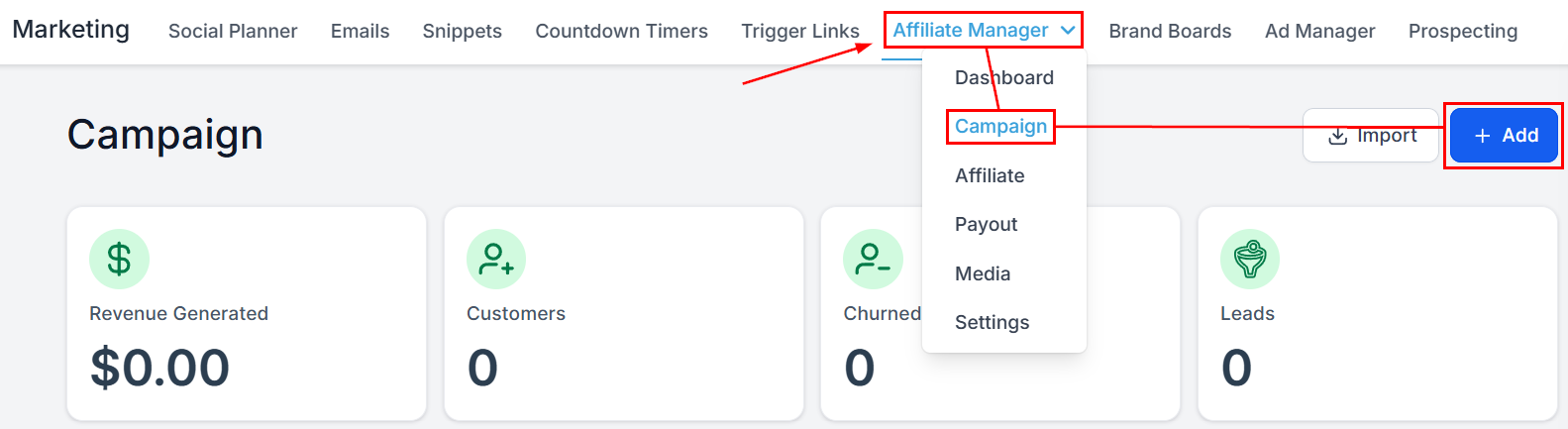
1. Create a new affiliate campaign.
<Frame>
  <img src="https://mintcdn.com/fundingmachine-b7281907/HVlxENosbv4ELwno/images/affiliate-manager/how-to-pay-affiliates-for-lead-generation-using-pay-per-lead/01.png?fit=max&auto=format&n=HVlxENosbv4ELwno&q=85&s=a50d2f573ccf73236c4b8554414f2c6a" alt="Create a New Campaign in the Affiliate Manager" width="1583" height="433" data-path="images/affiliate-manager/how-to-pay-affiliates-for-lead-generation-using-pay-per-lead/01.png" />
</Frame>

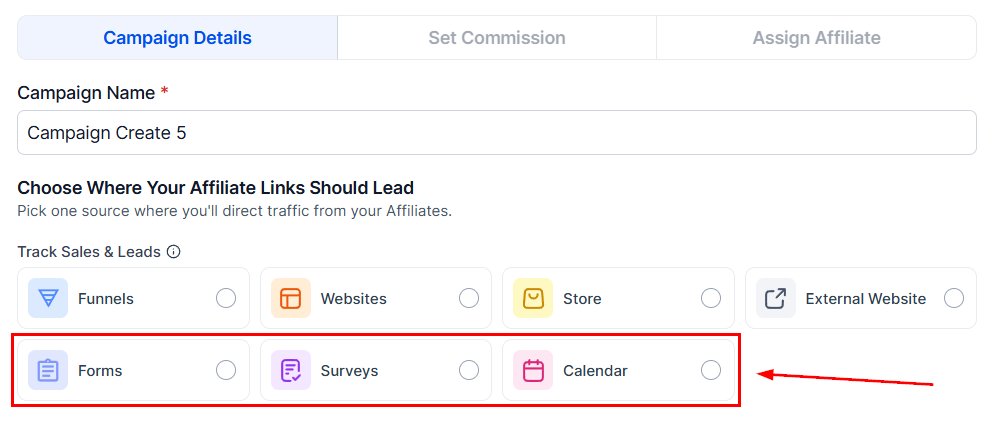
2. Choose the source — Forms, Surveys, or Calendars (the three sources PPL supports) — and configure the source details.
<Frame>
  <img src="https://mintcdn.com/fundingmachine-b7281907/HVlxENosbv4ELwno/images/affiliate-manager/how-to-pay-affiliates-for-lead-generation-using-pay-per-lead/02.png?fit=max&auto=format&n=HVlxENosbv4ELwno&q=85&s=457380d36708fed7f1492af0aa8bf78f" alt="Select Source Type in the Affiliate Manager" width="993" height="425" data-path="images/affiliate-manager/how-to-pay-affiliates-for-lead-generation-using-pay-per-lead/02.png" />
</Frame>

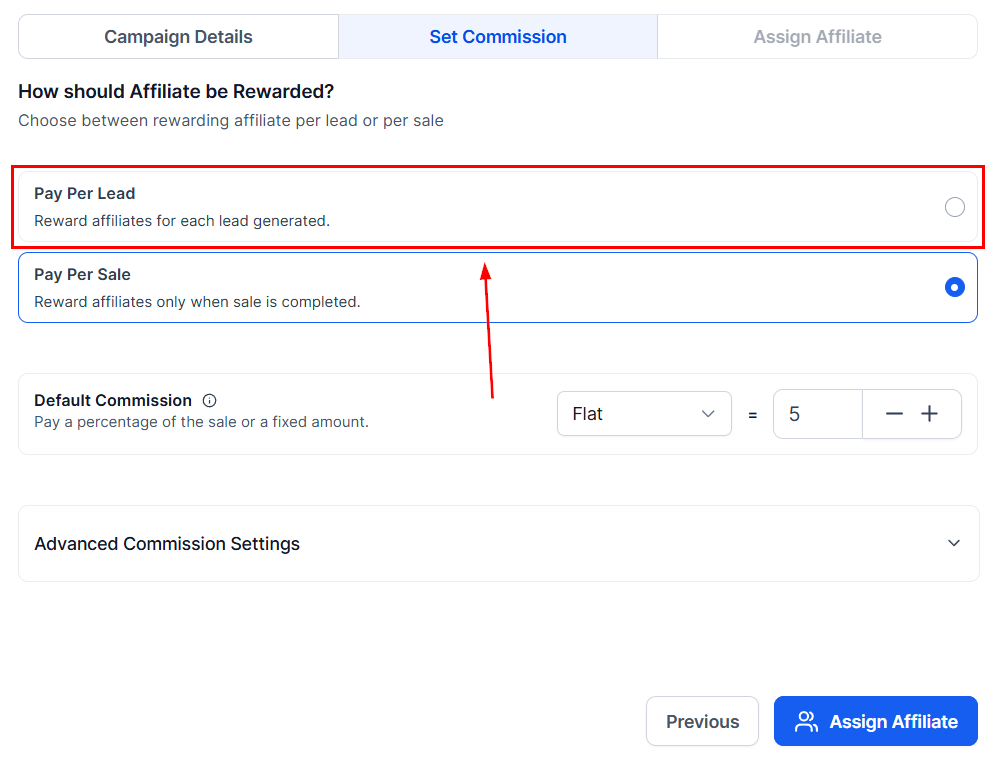
3. In the **Commissions** tab, select the Pay-Per-Lead option.
<Frame>
  <img src="https://mintcdn.com/fundingmachine-b7281907/HVlxENosbv4ELwno/images/affiliate-manager/how-to-pay-affiliates-for-lead-generation-using-pay-per-lead/03.png?fit=max&auto=format&n=HVlxENosbv4ELwno&q=85&s=e8ea782469fe9a44cb6097ec4dfbf7b1" alt="Enable Pay-Per-Lead in the Affiliate Manager" width="998" height="760" data-path="images/affiliate-manager/how-to-pay-affiliates-for-lead-generation-using-pay-per-lead/03.png" />
</Frame>

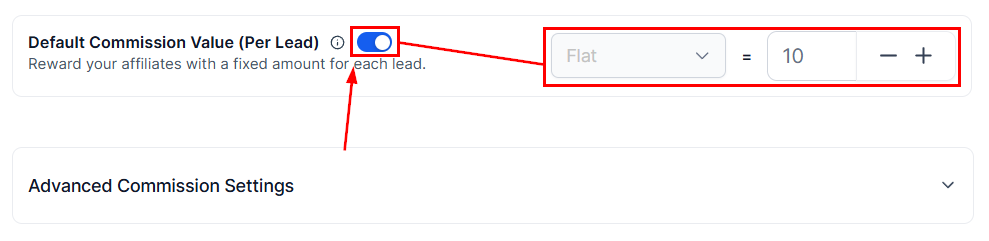
4. Toggle on Pay-Per-Lead and set the commission amount per lead.
<Frame>
  <img src="https://mintcdn.com/fundingmachine-b7281907/HVlxENosbv4ELwno/images/affiliate-manager/how-to-pay-affiliates-for-lead-generation-using-pay-per-lead/04.png?fit=max&auto=format&n=HVlxENosbv4ELwno&q=85&s=07ab90542ef9939788938e4b79adfe54" alt="Set Per Lead Commission in the Affiliate Manager" width="989" height="241" data-path="images/affiliate-manager/how-to-pay-affiliates-for-lead-generation-using-pay-per-lead/04.png" />
</Frame>

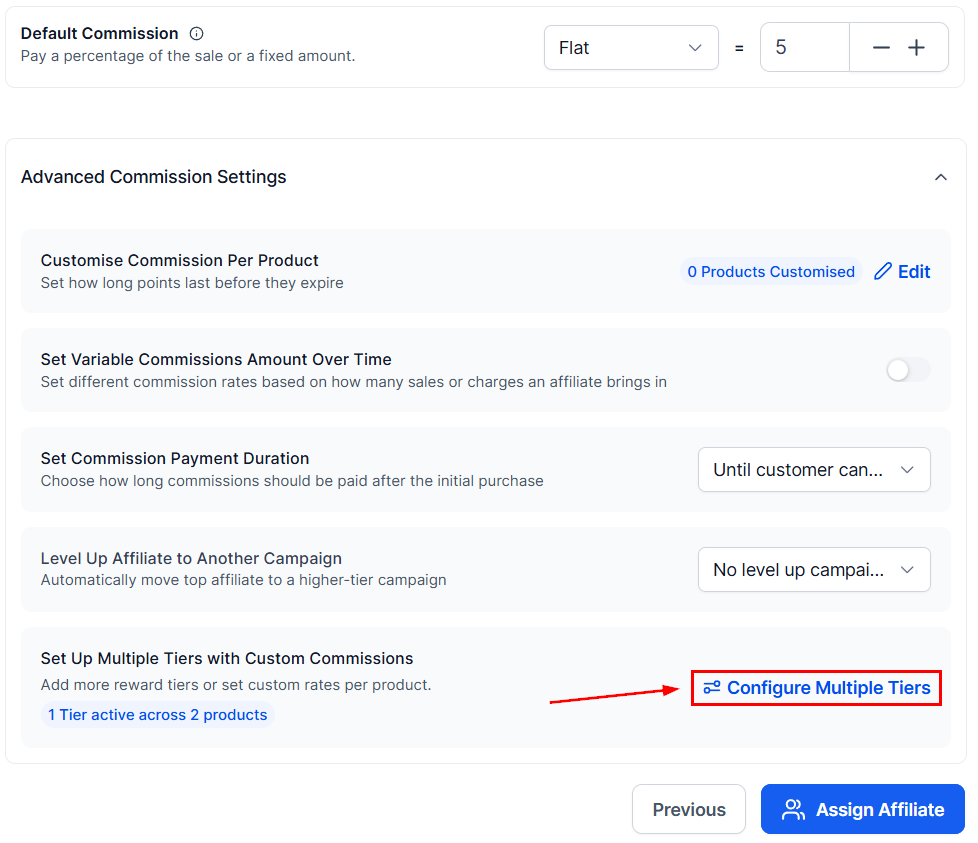
5. Optionally set up [multiple tiers](/operators/affiliates/how-to-setup-multi-tier-commissions-for-your-affiliate-campaigns) under advanced commission settings.
<Frame>
  <img src="https://mintcdn.com/fundingmachine-b7281907/2SMOvA86qKqs41So/images/affiliate-manager/setting-up-an-affiliate-campaign/15.png?fit=max&auto=format&n=2SMOvA86qKqs41So&q=85&s=aadb75b85410fa78be0c9362b68e5754" alt="Configure Advanced Commission Settings (Optional) in the Affiliate Manager" width="978" height="843" data-path="images/affiliate-manager/setting-up-an-affiliate-campaign/15.png" />
</Frame>

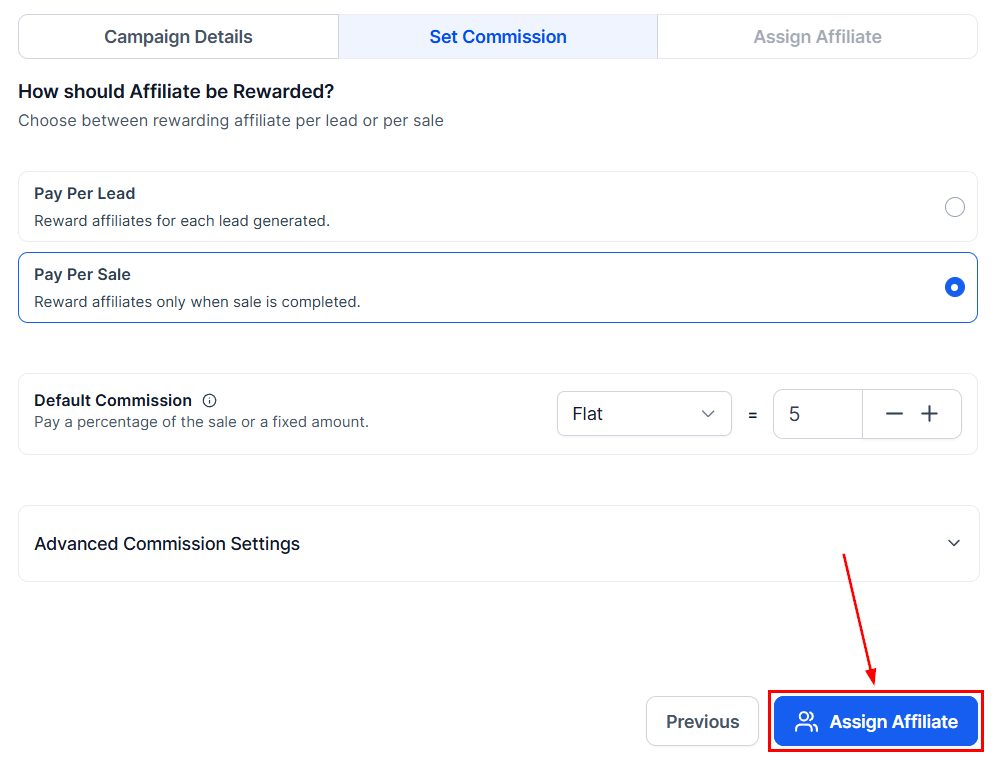
6. Add the campaign description and assign the participating partners.
<Frame>
  <img src="https://mintcdn.com/fundingmachine-b7281907/2SMOvA86qKqs41So/images/affiliate-manager/setting-up-an-affiliate-campaign/20.png?fit=max&auto=format&n=2SMOvA86qKqs41So&q=85&s=2b0fbdb23ad8edb27f2269c117461dd9" alt="Add Campaign Description & Assign Affiliates in the Affiliate Manager" width="998" height="760" data-path="images/affiliate-manager/setting-up-an-affiliate-campaign/20.png" />
</Frame>

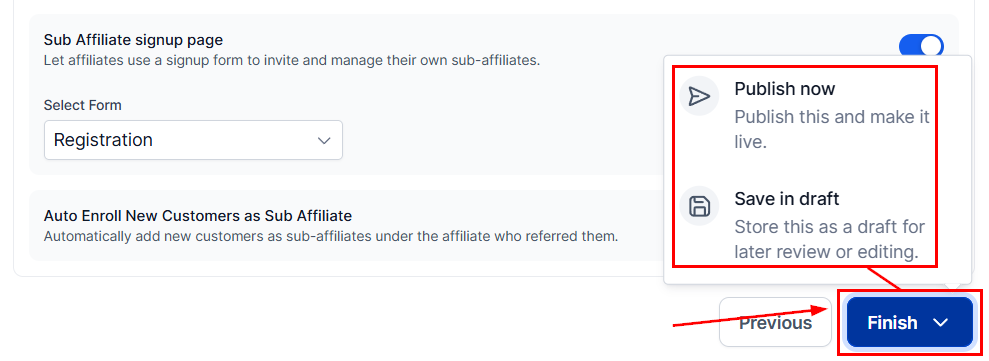
7. Review the remaining settings and publish.
<Frame>
  <img src="https://mintcdn.com/fundingmachine-b7281907/2SMOvA86qKqs41So/images/affiliate-manager/setting-up-an-affiliate-campaign/26.png?fit=max&auto=format&n=2SMOvA86qKqs41So&q=85&s=cf7198310a64b8f8b9dbbc000725fd01" alt="Review & Finalize in the Affiliate Manager" width="989" height="361" data-path="images/affiliate-manager/setting-up-an-affiliate-campaign/26.png" />
</Frame>

## Tracking leads and commissions

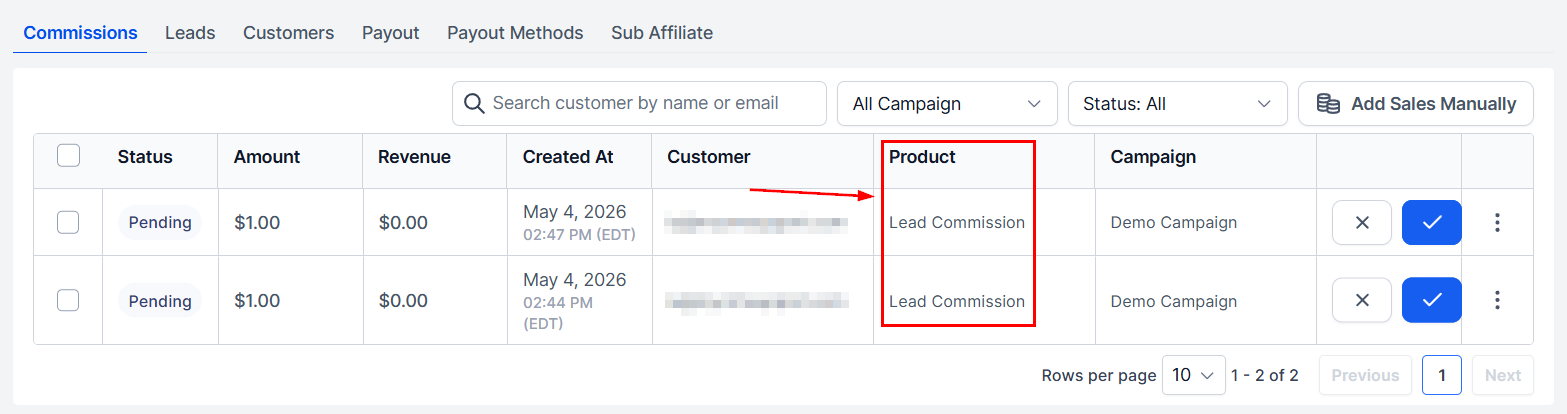
Once live, commissions generate automatically as partners produce leads. Track them in the **Commissions** tab on the partner's profile — the Product column shows "Lead Commission" for these.
<Frame>
  <img src="https://mintcdn.com/fundingmachine-b7281907/HVlxENosbv4ELwno/images/affiliate-manager/how-to-pay-affiliates-for-lead-generation-using-pay-per-lead/08.png?fit=max&auto=format&n=HVlxENosbv4ELwno&q=85&s=8e63b8c3bdae1a5549b59914384c4f6e" alt="Tracking Leads and Commissions in the Affiliate Manager" width="1567" height="414" data-path="images/affiliate-manager/how-to-pay-affiliates-for-lead-generation-using-pay-per-lead/08.png" />
</Frame>
