> ## Documentation Index
> Fetch the complete documentation index at: https://docs.myfundingmachine.com/llms.txt
> Use this file to discover all available pages before exploring further.

# How to Pay Your Partners

> Compare the automatic and manual ways to pay partner commissions and pick the one that fits your program.

# How to Pay Your Partners

Payouts are generated automatically from your campaign commissions; you choose how to pay them. You can use any provider as long as you mark payouts as completed, but two built-in paths cover most programs:

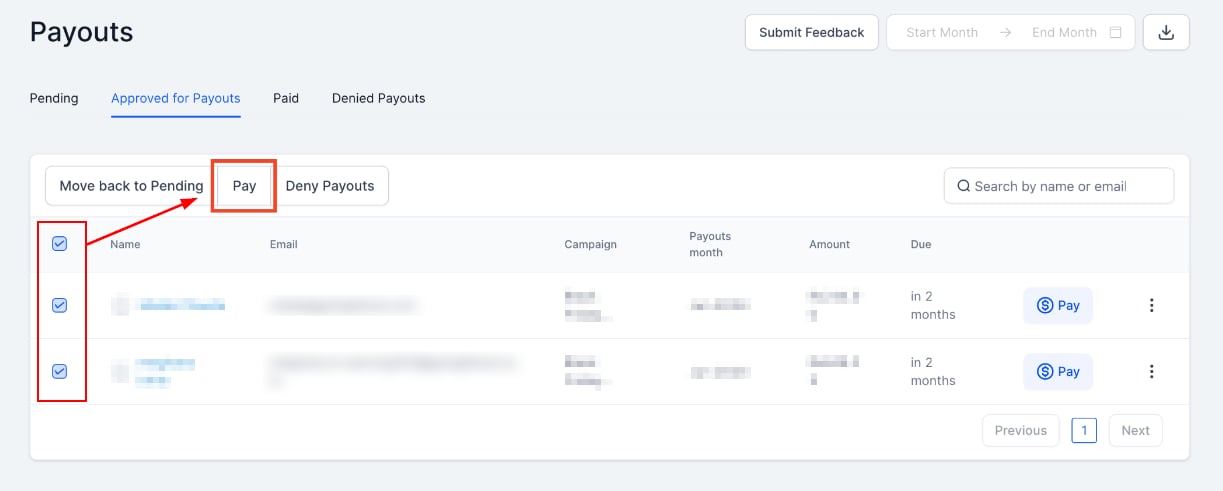
* **Auto payouts via PayPal (fastest)** — pay partners in bulk directly from the Affiliate Manager through the PayPal Payouts API, with no manual marking.
* **Bank payments** — process transfers through your bank, then mark the payouts as paid.

<Note>
  Control which payout methods partners see under **Affiliate Manager → Settings → Affiliate Portal Settings**. Partners only see the methods you enable.
</Note>

## Auto payouts via PayPal

After a one-time setup, the PayPal Payouts API pays multiple partners at once without leaving the platform — no logging into PayPal, no manual "paid" marking.
<Frame>
  <img src="https://mintcdn.com/fundingmachine-b7281907/HVlxENosbv4ELwno/images/affiliate-manager/automate-affiliate-payouts-with-paypal/04.png?fit=max&auto=format&n=HVlxENosbv4ELwno&q=85&s=795d85fdd3eb5e8c17242b925fe8dcd3" alt="Auto Payouts via PayPal in the Affiliate Manager" width="1223" height="491" data-path="images/affiliate-manager/automate-affiliate-payouts-with-paypal/04.png" />
</Frame>

Setup steps: [Automate partner payouts with PayPal](/operators/affiliates/automate-affiliate-payouts-with-paypal).

## Manual payments via bank transfer

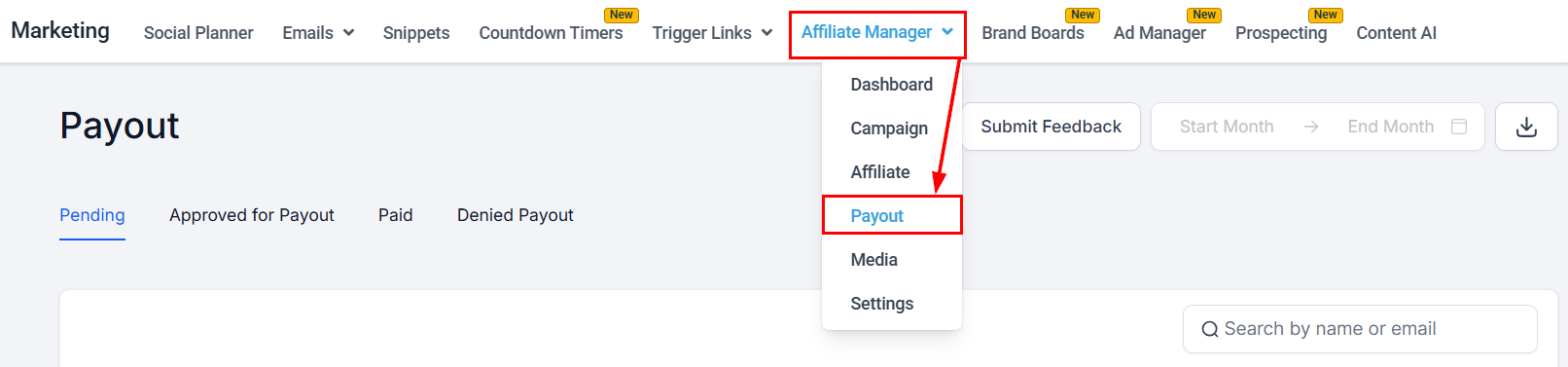
1. Open the Affiliate payouts section.
<Frame>
  <img src="https://mintcdn.com/fundingmachine-b7281907/2SMOvA86qKqs41So/images/affiliate-manager/how-to-pay-your-affiliates/02.png?fit=max&auto=format&n=2SMOvA86qKqs41So&q=85&s=d1d4dd7e9412225b2fdb84c3b8fc19f5" alt="Manual Payments via Bank Transfers in the Affiliate Manager" width="1612" height="377" data-path="images/affiliate-manager/how-to-pay-your-affiliates/02.png" />
</Frame>

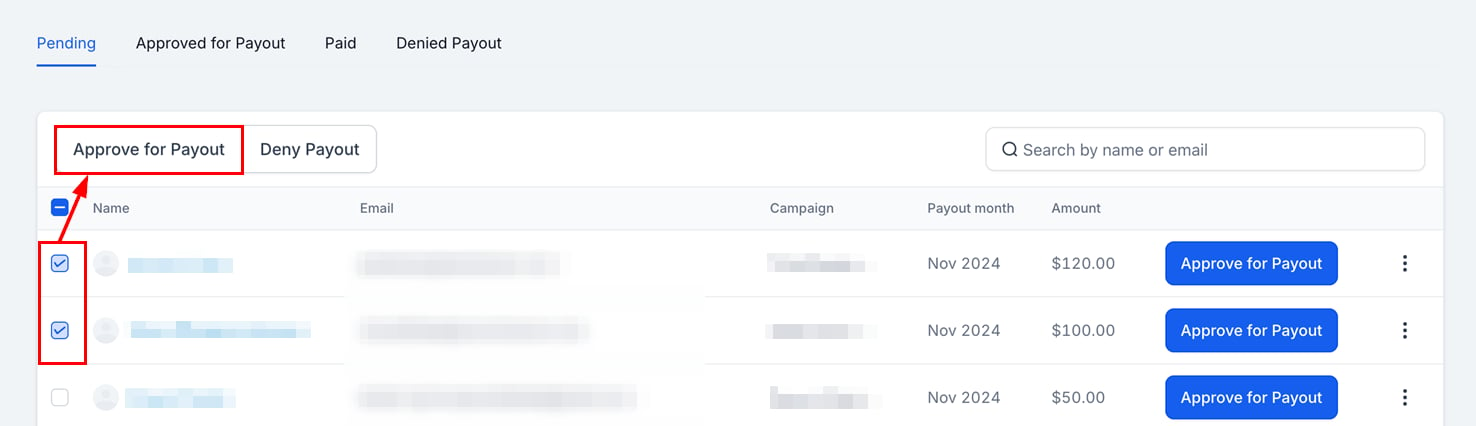
2. In the **Pending** tab, approve the payouts you want to process.
<Frame>
  <img src="https://mintcdn.com/fundingmachine-b7281907/2SMOvA86qKqs41So/images/affiliate-manager/how-to-pay-your-affiliates/03.png?fit=max&auto=format&n=2SMOvA86qKqs41So&q=85&s=51bcdd364f5814af5a115b3dfda50922" alt="Manual Payments via Bank Transfers in the Affiliate Manager (2)" width="1476" height="426" data-path="images/affiliate-manager/how-to-pay-your-affiliates/03.png" />
</Frame>

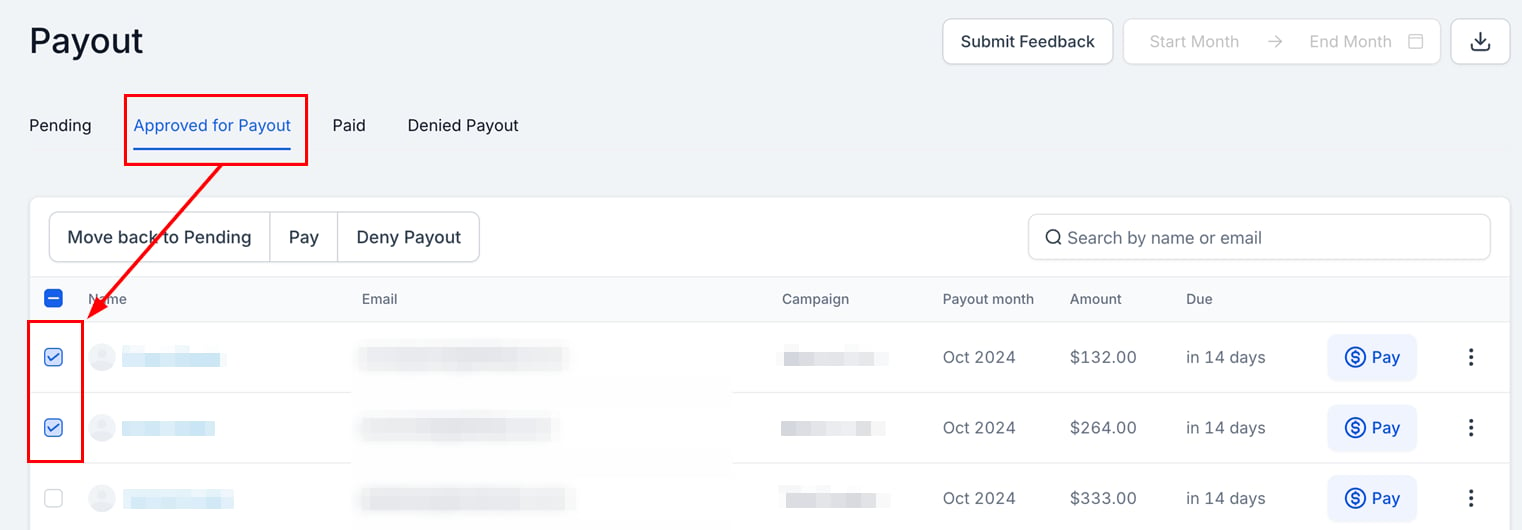
3. In the **Approved for Payout** tab, select the payouts to process.
<Frame>
  <img src="https://mintcdn.com/fundingmachine-b7281907/2SMOvA86qKqs41So/images/affiliate-manager/how-to-pay-your-affiliates/04.png?fit=max&auto=format&n=2SMOvA86qKqs41So&q=85&s=593bb12170514e67a4cc681b2f20b858" alt="Manual Payments via Bank Transfers in the Affiliate Manager (3)" width="1522" height="530" data-path="images/affiliate-manager/how-to-pay-your-affiliates/04.png" />
</Frame>

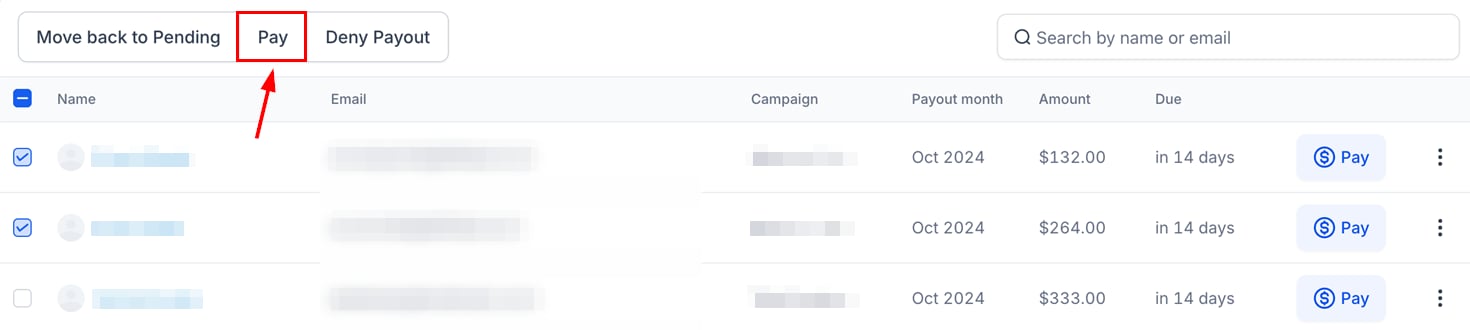
4. Click **Pay**.

<Frame>
  <img src="https://mintcdn.com/fundingmachine-b7281907/2SMOvA86qKqs41So/images/affiliate-manager/how-to-pay-your-affiliates/05.png?fit=max&auto=format&n=2SMOvA86qKqs41So&q=85&s=dabd70c0f24f8d73f9b5aba5d96027fe" alt="Manual Payments via Bank Transfers in the Affiliate Manager (4)" width="1470" height="330" data-path="images/affiliate-manager/how-to-pay-your-affiliates/05.png" />
</Frame>

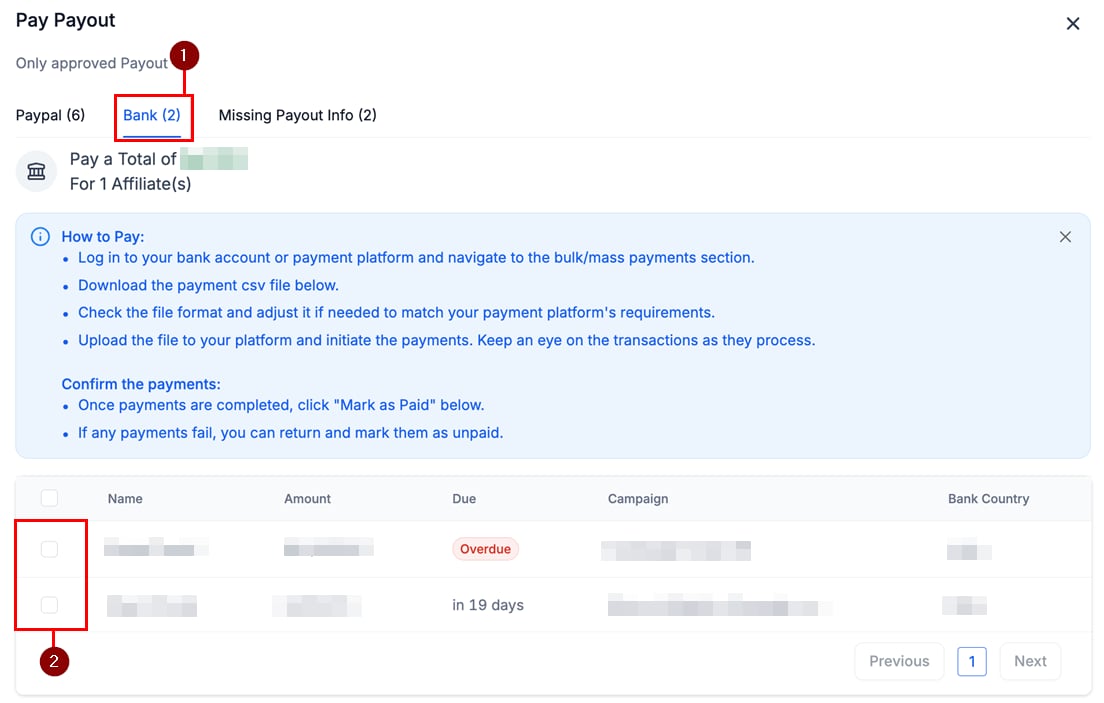
5. In the payment method window, open the **Bank** tab and verify the partners to pay.
<Frame>
  <img src="https://mintcdn.com/fundingmachine-b7281907/2SMOvA86qKqs41So/images/affiliate-manager/how-to-pay-your-affiliates/06.png?fit=max&auto=format&n=2SMOvA86qKqs41So&q=85&s=c407fc26068169ce63a84f5654603012" alt="Manual Payments via Bank Transfers in the Affiliate Manager (5)" width="1104" height="703" data-path="images/affiliate-manager/how-to-pay-your-affiliates/06.png" />
</Frame>

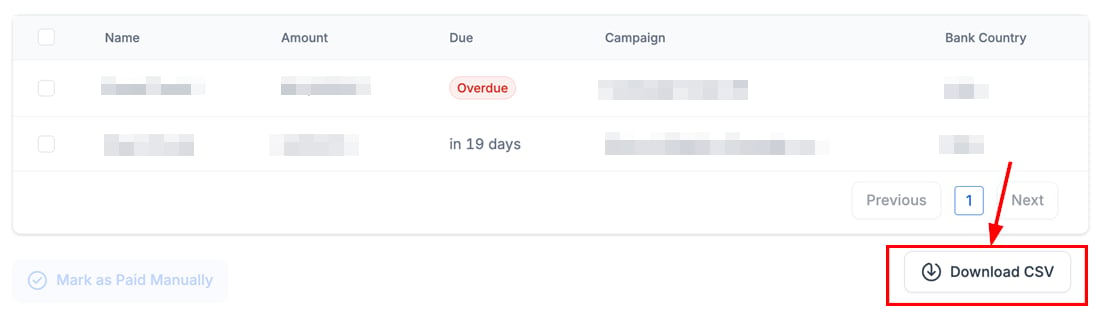
6. Download the CSV and complete the payment through your banking platform.
<Frame>
  <img src="https://mintcdn.com/fundingmachine-b7281907/2SMOvA86qKqs41So/images/affiliate-manager/how-to-pay-your-affiliates/07.png?fit=max&auto=format&n=2SMOvA86qKqs41So&q=85&s=ca31aa687f92a3223a6691dc5d9d86f8" alt="Manual Payments via Bank Transfers in the Affiliate Manager (6)" width="1106" height="315" data-path="images/affiliate-manager/how-to-pay-your-affiliates/07.png" />
</Frame>

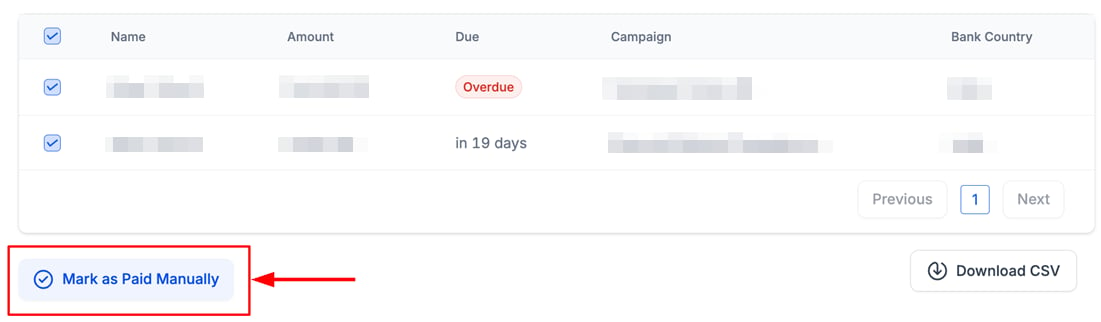
7. Once paid, click **Mark as Paid** to update the status.
<Frame>
  <img src="https://mintcdn.com/fundingmachine-b7281907/2SMOvA86qKqs41So/images/affiliate-manager/how-to-pay-your-affiliates/08.png?fit=max&auto=format&n=2SMOvA86qKqs41So&q=85&s=44d82c51f589f398584c1221b54360ee" alt="Manual Payments via Bank Transfers in the Affiliate Manager (7)" width="1101" height="322" data-path="images/affiliate-manager/how-to-pay-your-affiliates/08.png" />
</Frame>

For the full payout queue — pending, approved, paid, and denied — see [Payouts](/operators/affiliates/affiliate-payouts).