> ## Documentation Index
> Fetch the complete documentation index at: https://docs.myfundingmachine.com/llms.txt
> Use this file to discover all available pages before exploring further.

# Managing Partners with Quick Campaign Actions

> Add, remove, or move partners between campaigns straight from the Affiliate List Page without opening each record.

# Managing Partners with Quick Campaign Actions

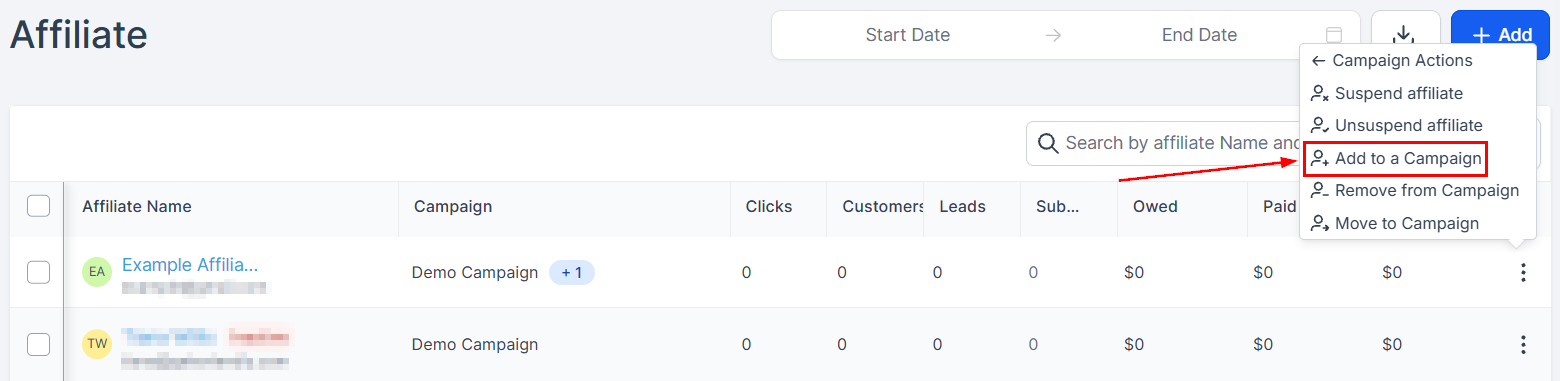
Quick Campaign Actions add, remove, or move a partner between campaigns directly from the Affiliate List Page, without opening each record.

## Add a partner to a campaign

1. In the Affiliate Manager, open the Affiliate List Page.
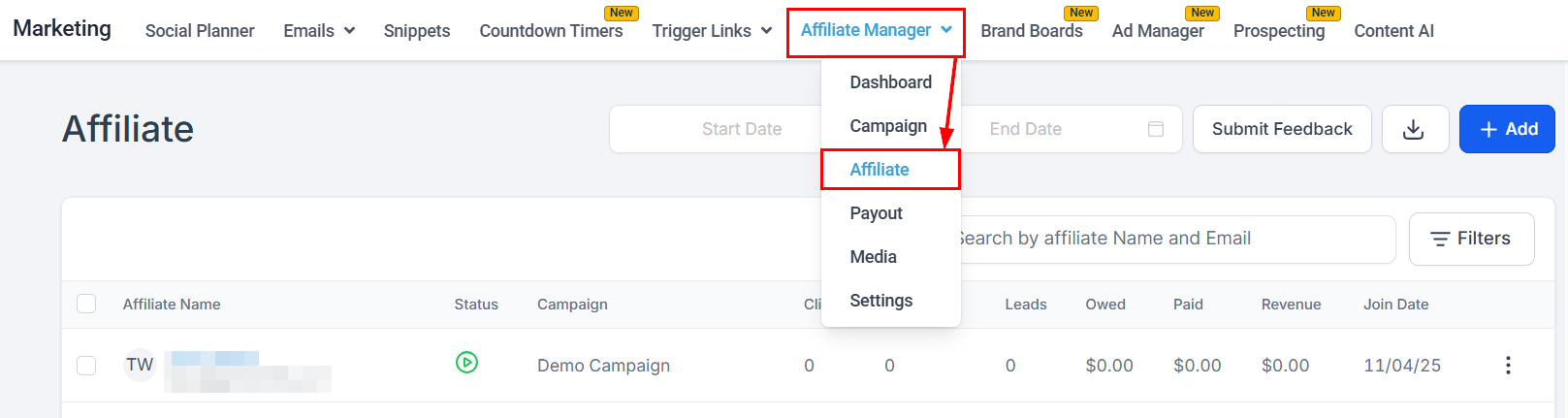
<Frame>
  <img src="https://mintcdn.com/fundingmachine-b7281907/2SMOvA86qKqs41So/images/affiliate-manager/managing-affiliates-with-quick-campaign-actions/01.png?fit=max&auto=format&n=2SMOvA86qKqs41So&q=85&s=1176790d1b44729208bdc006171ff380" alt="Adding an Affiliate to a Campaign in the Affiliate Manager" width="1617" height="431" data-path="images/affiliate-manager/managing-affiliates-with-quick-campaign-actions/01.png" />
</Frame>

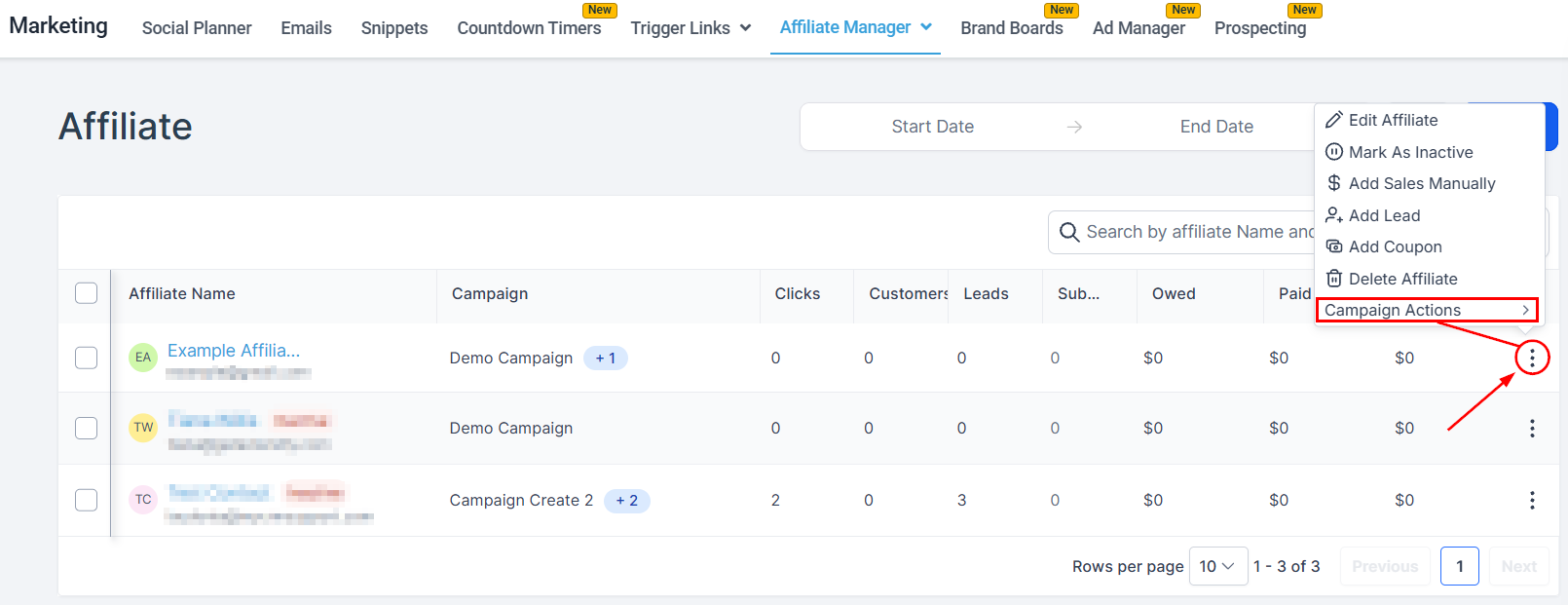
2. Click the three-dot menu next to the partner and select **Campaign Actions**.
<Frame>
  <img src="https://mintcdn.com/fundingmachine-b7281907/2SMOvA86qKqs41So/images/affiliate-manager/managing-affiliates-with-quick-campaign-actions/02.png?fit=max&auto=format&n=2SMOvA86qKqs41So&q=85&s=4538c2164142b403c144eb52d834d7f5" alt="Adding an Affiliate to a Campaign in the Affiliate Manager (2)" width="1610" height="621" data-path="images/affiliate-manager/managing-affiliates-with-quick-campaign-actions/02.png" />
</Frame>

3. Click **Add to Campaign**.

<Frame>
  <img src="https://mintcdn.com/fundingmachine-b7281907/2SMOvA86qKqs41So/images/affiliate-manager/managing-affiliates-with-quick-campaign-actions/03.png?fit=max&auto=format&n=2SMOvA86qKqs41So&q=85&s=53c3a360c5e2866e2c42539330ade2f3" alt="Adding an Affiliate to a Campaign in the Affiliate Manager (3)" width="1560" height="381" data-path="images/affiliate-manager/managing-affiliates-with-quick-campaign-actions/03.png" />
</Frame>

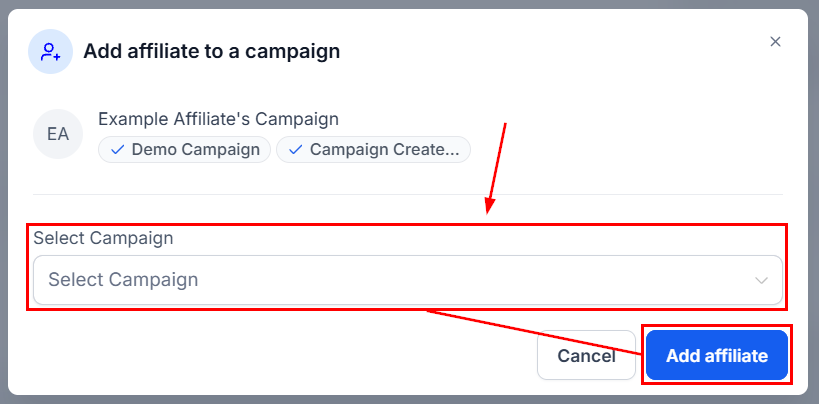
4. Choose the campaign in the pop-up and click **Add Affiliate**.
<Frame>
  <img src="https://mintcdn.com/fundingmachine-b7281907/2SMOvA86qKqs41So/images/affiliate-manager/managing-affiliates-with-quick-campaign-actions/04.png?fit=max&auto=format&n=2SMOvA86qKqs41So&q=85&s=08cfd68308c39936a0bcea9da05ff5e4" alt="Adding an Affiliate to a Campaign in the Affiliate Manager (4)" width="819" height="404" data-path="images/affiliate-manager/managing-affiliates-with-quick-campaign-actions/04.png" />
</Frame>

## Remove a partner from a campaign

1. On the Affiliate List Page, click the three-dot menu next to the partner.

<Frame>
  <img src="https://mintcdn.com/fundingmachine-b7281907/2SMOvA86qKqs41So/images/affiliate-manager/managing-affiliates-with-quick-campaign-actions/02.png?fit=max&auto=format&n=2SMOvA86qKqs41So&q=85&s=4538c2164142b403c144eb52d834d7f5" alt="Removing an Affiliate from a Campaign in the Affiliate Manager" width="1610" height="621" data-path="images/affiliate-manager/managing-affiliates-with-quick-campaign-actions/02.png" />
</Frame>

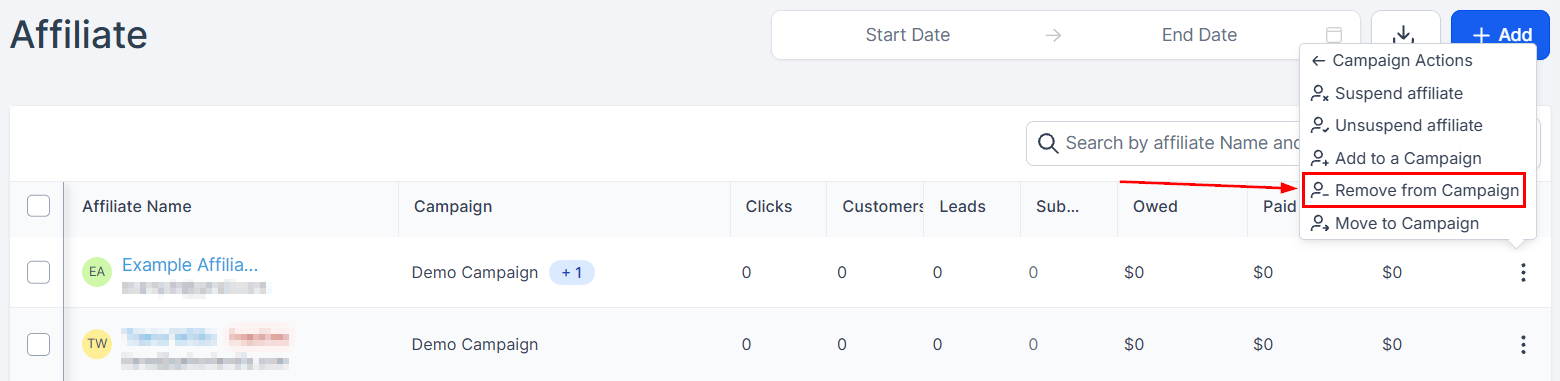
2. Select **Remove from Campaign**.

<Frame>
  <img src="https://mintcdn.com/fundingmachine-b7281907/2SMOvA86qKqs41So/images/affiliate-manager/managing-affiliates-with-quick-campaign-actions/06.png?fit=max&auto=format&n=2SMOvA86qKqs41So&q=85&s=e2838b50de0d06f93910869ff75c726f" alt="Removing an Affiliate from a Campaign in the Affiliate Manager (2)" width="1560" height="381" data-path="images/affiliate-manager/managing-affiliates-with-quick-campaign-actions/06.png" />
</Frame>

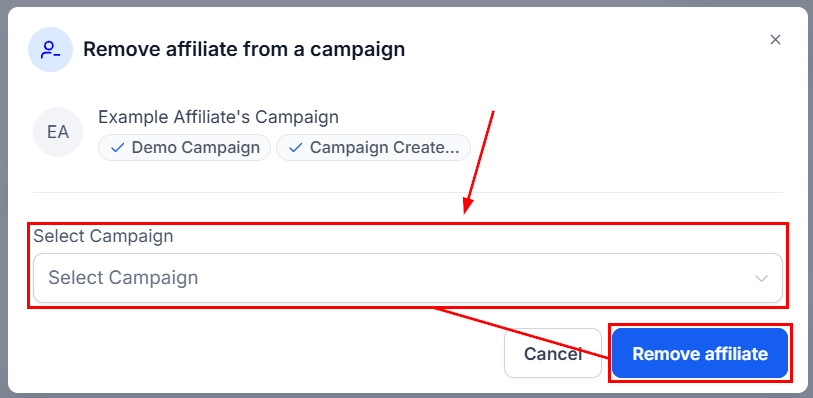
3. Choose the campaign and click **Remove Affiliate**.
<Frame>
  <img src="https://mintcdn.com/fundingmachine-b7281907/2SMOvA86qKqs41So/images/affiliate-manager/managing-affiliates-with-quick-campaign-actions/07.png?fit=max&auto=format&n=2SMOvA86qKqs41So&q=85&s=13c43631614b7ea0ba409945c30d5848" alt="Removing an Affiliate from a Campaign in the Affiliate Manager (3)" width="813" height="398" data-path="images/affiliate-manager/managing-affiliates-with-quick-campaign-actions/07.png" />
</Frame>

## Move a partner between campaigns

1. Click the three-dot menu next to the partner and select **Campaign Actions**.

<Frame>
  <img src="https://mintcdn.com/fundingmachine-b7281907/2SMOvA86qKqs41So/images/affiliate-manager/managing-affiliates-with-quick-campaign-actions/02.png?fit=max&auto=format&n=2SMOvA86qKqs41So&q=85&s=4538c2164142b403c144eb52d834d7f5" alt="Moving an Affiliate from a Campaign in the Affiliate Manager" width="1610" height="621" data-path="images/affiliate-manager/managing-affiliates-with-quick-campaign-actions/02.png" />
</Frame>

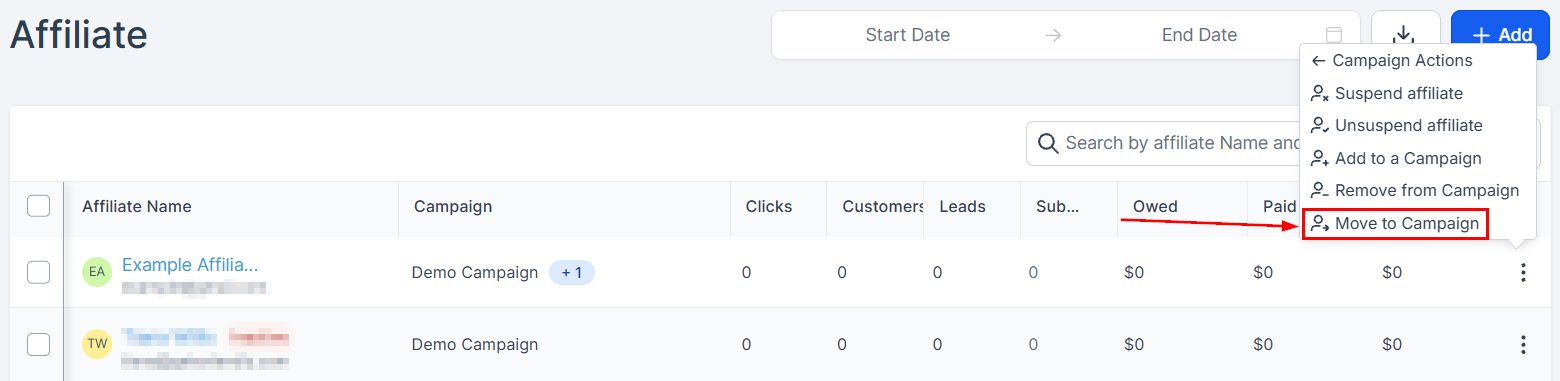
2. Select **Move to Campaign**.

<Frame>
  <img src="https://mintcdn.com/fundingmachine-b7281907/2SMOvA86qKqs41So/images/affiliate-manager/managing-affiliates-with-quick-campaign-actions/09.png?fit=max&auto=format&n=2SMOvA86qKqs41So&q=85&s=034288359696f34f16163c1a2cf51401" alt="Moving an Affiliate from a Campaign in the Affiliate Manager (2)" width="1560" height="381" data-path="images/affiliate-manager/managing-affiliates-with-quick-campaign-actions/09.png" />
</Frame>

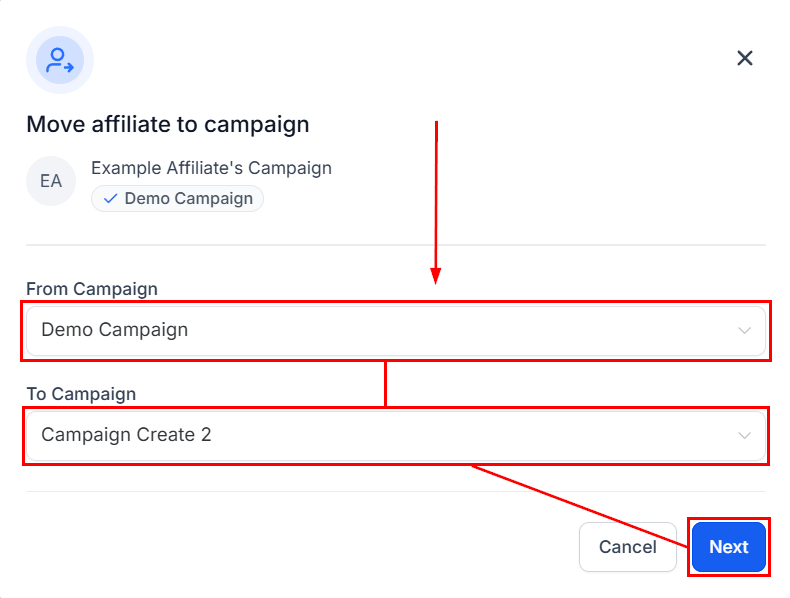
3. Select the campaign the partner is currently in, then the destination campaign, and click **Next**.
<Frame>
  <img src="https://mintcdn.com/fundingmachine-b7281907/2SMOvA86qKqs41So/images/affiliate-manager/managing-affiliates-with-quick-campaign-actions/10.png?fit=max&auto=format&n=2SMOvA86qKqs41So&q=85&s=cff3ae5eb095515899d493ff69401795" alt="Moving an Affiliate from a Campaign in the Affiliate Manager (3)" width="790" height="598" data-path="images/affiliate-manager/managing-affiliates-with-quick-campaign-actions/10.png" />
</Frame>

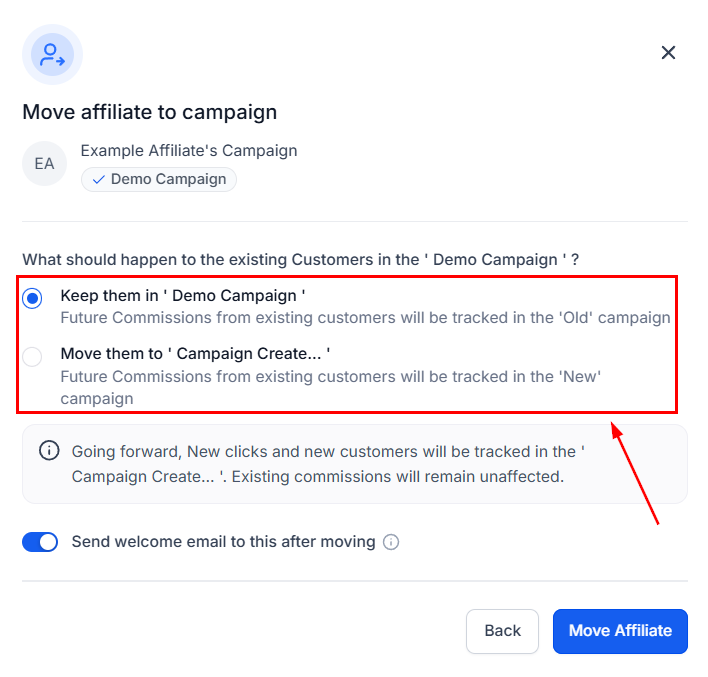
4. Choose whether future commissions from referred customers stay attributed to the original campaign or follow the partner to the new one.
<Frame>
  <img src="https://mintcdn.com/fundingmachine-b7281907/2SMOvA86qKqs41So/images/affiliate-manager/managing-affiliates-with-quick-campaign-actions/11.png?fit=max&auto=format&n=2SMOvA86qKqs41So&q=85&s=4aea9cf35b66672bc2339bbd7467dd2d" alt="Moving an Affiliate from a Campaign in the Affiliate Manager (4)" width="708" height="677" data-path="images/affiliate-manager/managing-affiliates-with-quick-campaign-actions/11.png" />
</Frame>

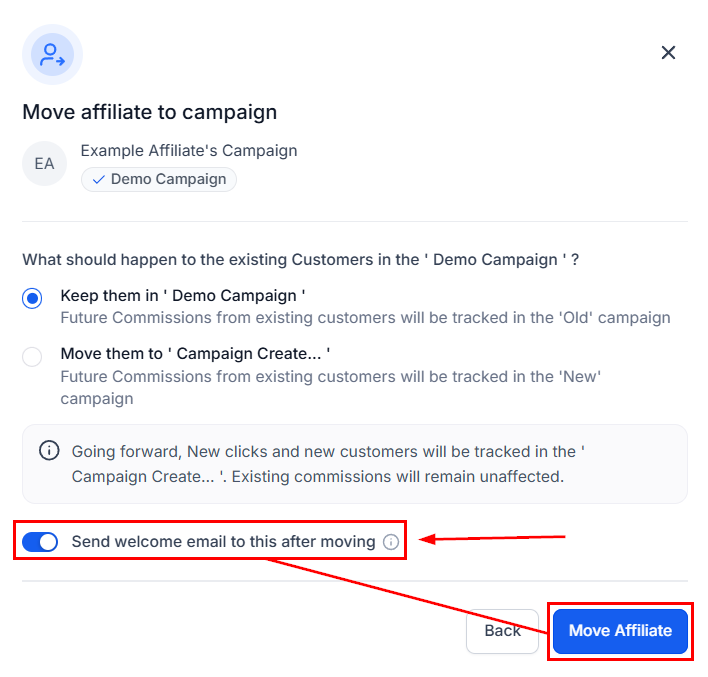
5. Toggle the welcome email as preferred, then click **Move Affiliate**.
<Frame>
  <img src="https://mintcdn.com/fundingmachine-b7281907/2SMOvA86qKqs41So/images/affiliate-manager/managing-affiliates-with-quick-campaign-actions/12.png?fit=max&auto=format&n=2SMOvA86qKqs41So&q=85&s=3aa7a94d01d022e2fcbdb793deab1d18" alt="Moving an Affiliate from a Campaign in the Affiliate Manager (5)" width="708" height="677" data-path="images/affiliate-manager/managing-affiliates-with-quick-campaign-actions/12.png" />
</Frame>