> ## Documentation Index
> Fetch the complete documentation index at: https://docs.myfundingmachine.com/llms.txt
> Use this file to discover all available pages before exploring further.

# Setting Up an Affiliate Campaign

> The full campaign build: details, source, products, commissions, description, partners, cookie life, and payout frequency.

# Setting Up an Affiliate Campaign

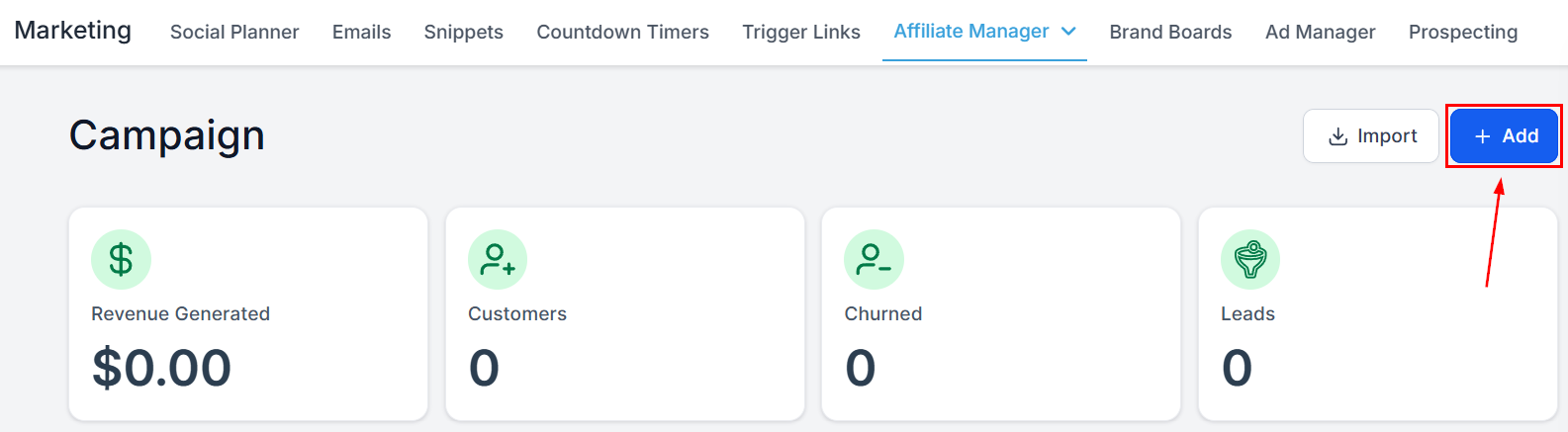
Click **+Add** in the upper right of the Campaign view to start.
<Frame>
  <img src="https://mintcdn.com/fundingmachine-b7281907/2SMOvA86qKqs41So/images/affiliate-manager/setting-up-an-affiliate-campaign/01.png?fit=max&auto=format&n=2SMOvA86qKqs41So&q=85&s=1855966a1c91f1d33b2d724cbb8dd1fe" alt="Setting Up an Affiliate Campaign in the Affiliate Manager" width="1585" height="437" data-path="images/affiliate-manager/setting-up-an-affiliate-campaign/01.png" />
</Frame>

## Campaign Details

### Campaign Name

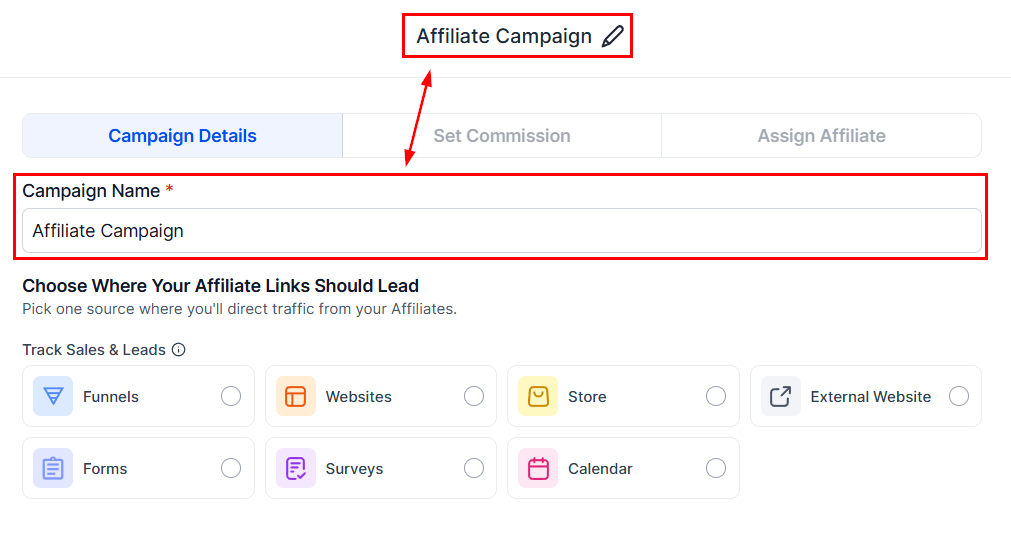
Enter a distinctive name — it is the campaign's identifier.
<Frame>
  <img src="https://mintcdn.com/fundingmachine-b7281907/2SMOvA86qKqs41So/images/affiliate-manager/setting-up-an-affiliate-campaign/02.png?fit=max&auto=format&n=2SMOvA86qKqs41So&q=85&s=16ec59e1e1e7afc2afc21a566551b5c8" alt="Campaign Name in the Affiliate Manager" width="1011" height="534" data-path="images/affiliate-manager/setting-up-an-affiliate-campaign/02.png" />
</Frame>

### Source

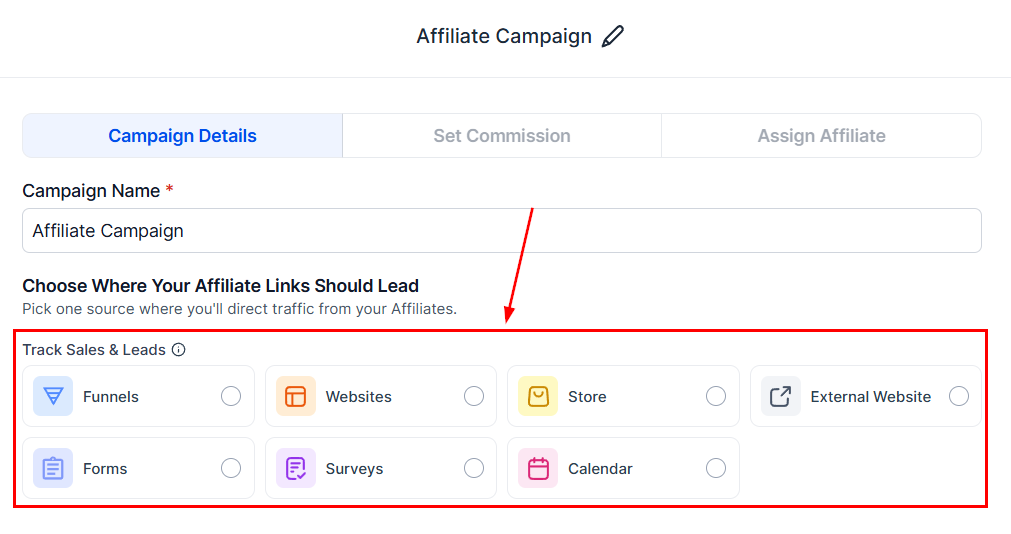
Select where the partner's leads will originate.
<Frame>
  <img src="https://mintcdn.com/fundingmachine-b7281907/2SMOvA86qKqs41So/images/affiliate-manager/setting-up-an-affiliate-campaign/03.png?fit=max&auto=format&n=2SMOvA86qKqs41So&q=85&s=5bca8d6a405ea6019f6ef18d23d29e0e" alt="Source in the Affiliate Manager" width="1011" height="534" data-path="images/affiliate-manager/setting-up-an-affiliate-campaign/03.png" />
</Frame>

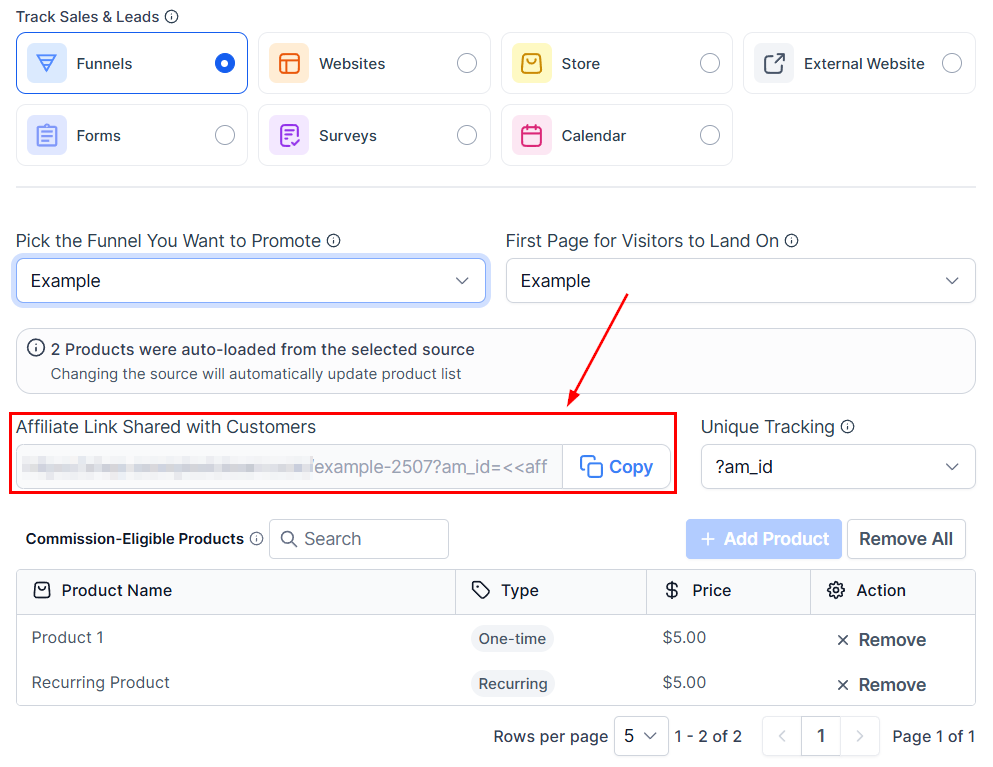
Funnels, websites, and stores must be linked to a domain. A preview of the campaign URL appears here.
<Frame>
  <img src="https://mintcdn.com/fundingmachine-b7281907/2SMOvA86qKqs41So/images/affiliate-manager/setting-up-an-affiliate-campaign/04.png?fit=max&auto=format&n=2SMOvA86qKqs41So&q=85&s=0b3cd1be0cc132ba45e7444bfc86b8be" alt="Source in the Affiliate Manager (2)" width="993" height="767" data-path="images/affiliate-manager/setting-up-an-affiliate-campaign/04.png" />
</Frame>

### Products

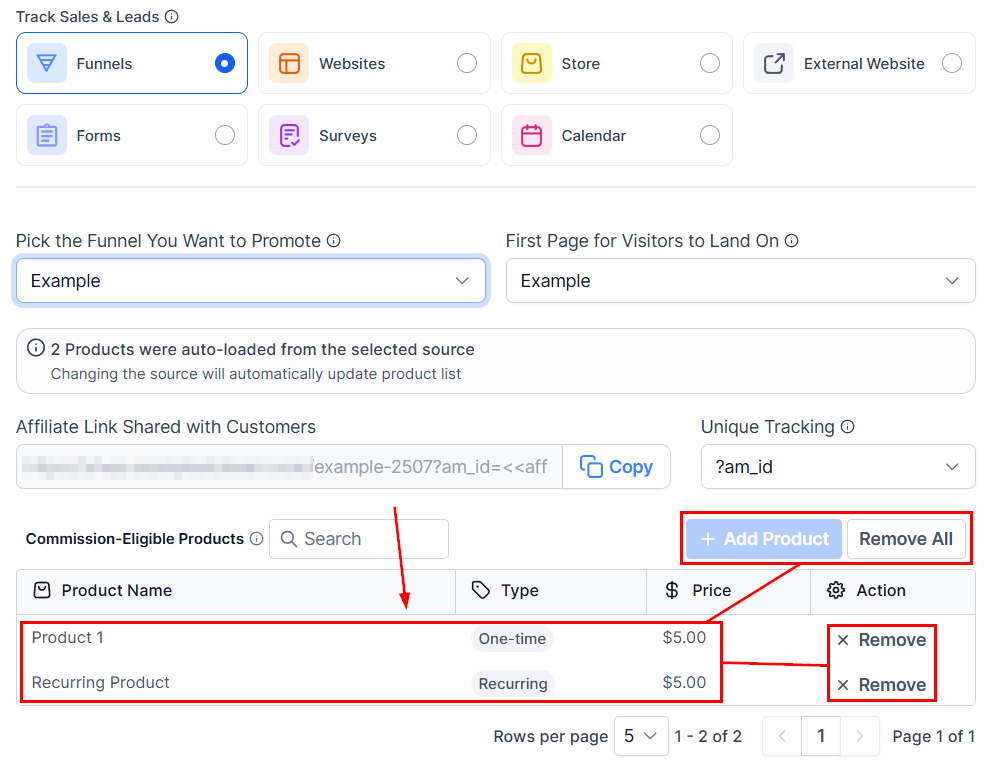
Choose the products commissions apply to. You can save the campaign at any point and return later.

<Note>
  A campaign cannot be **published** until products and partners are selected.
</Note>

<Frame>
  <img src="https://mintcdn.com/fundingmachine-b7281907/2SMOvA86qKqs41So/images/affiliate-manager/setting-up-an-affiliate-campaign/05.png?fit=max&auto=format&n=2SMOvA86qKqs41So&q=85&s=0e29cda439b1e5c7fadf1861a975f13b" alt="Products in the Affiliate Manager" width="993" height="767" data-path="images/affiliate-manager/setting-up-an-affiliate-campaign/05.png" />
</Frame>

Click **Next** for the Commissions section. Commission settings apply only to funnel, website, and store sources — the section is skipped for forms, surveys, and calendars, which use [Pay Per Lead](/operators/affiliates/how-to-pay-affiliates-for-lead-generation-using-pay-per-lead) or [Pay Per Sale](/operators/affiliates/how-to-pay-affiliates-for-lead-generation-using-pay-per-sale) instead.

## Commissions

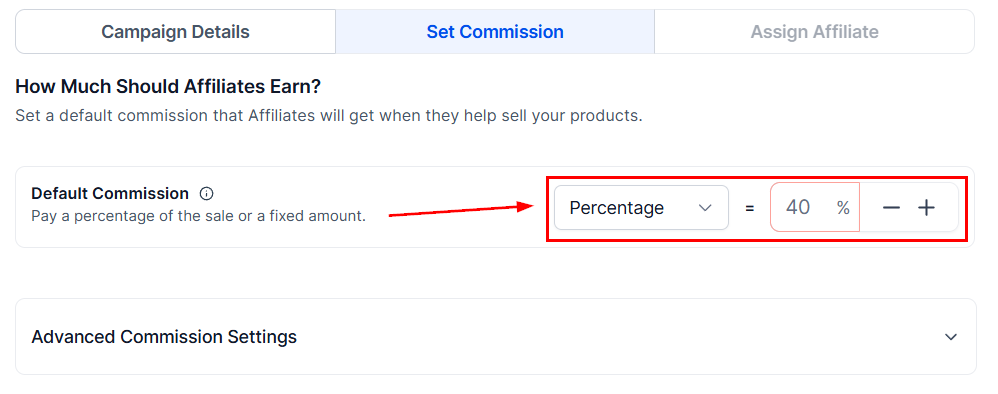
Set the percentage of each sale paid to partners.
<Frame>
  <img src="https://mintcdn.com/fundingmachine-b7281907/2SMOvA86qKqs41So/images/affiliate-manager/setting-up-an-affiliate-campaign/06.png?fit=max&auto=format&n=2SMOvA86qKqs41So&q=85&s=76216e5dbeff9f60911b8031ba3cae4e" alt="Commissions in the Affiliate Manager" width="998" height="394" data-path="images/affiliate-manager/setting-up-an-affiliate-campaign/06.png" />
</Frame>

### Advanced Commission Settings

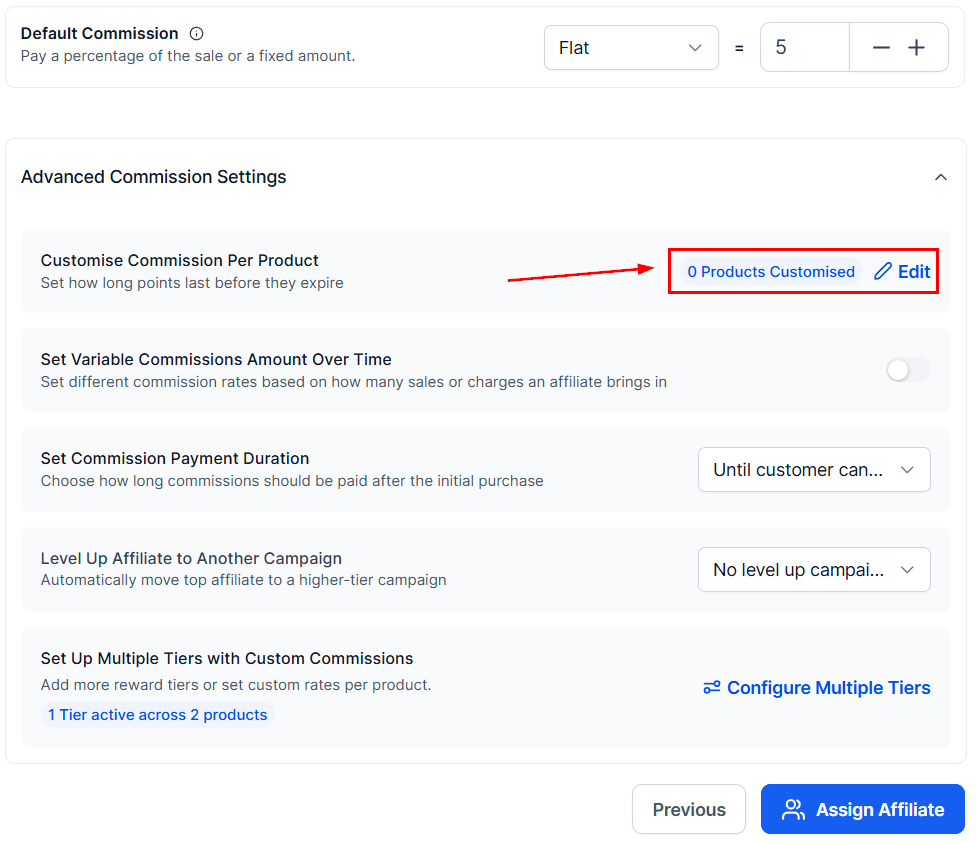
For per-product commissions, click the two-toggle icon.
<Frame>
  <img src="https://mintcdn.com/fundingmachine-b7281907/2SMOvA86qKqs41So/images/affiliate-manager/setting-up-an-affiliate-campaign/07.png?fit=max&auto=format&n=2SMOvA86qKqs41So&q=85&s=45b352df24724dcd6b32cc490e9c2d8b" alt="Advanced Commission Settings in the Affiliate Manager" width="978" height="843" data-path="images/affiliate-manager/setting-up-an-affiliate-campaign/07.png" />
</Frame>

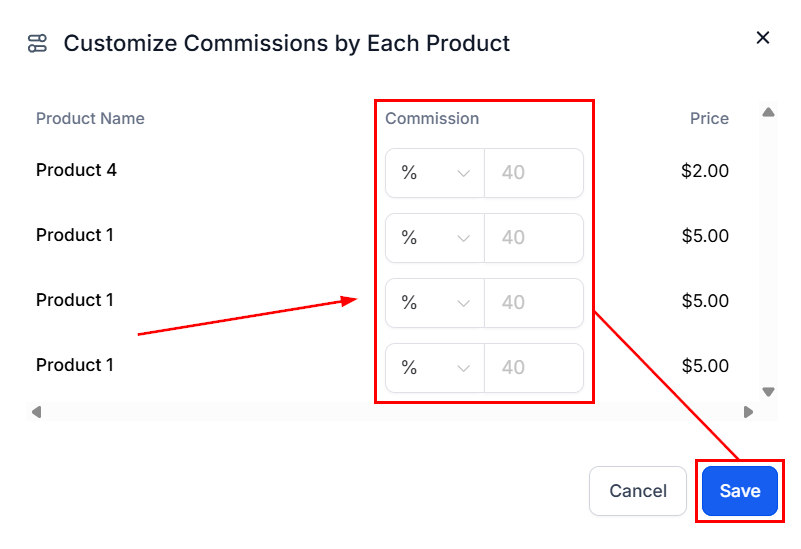
Enter the commission value, then save.
<Frame>
  <img src="https://mintcdn.com/fundingmachine-b7281907/2SMOvA86qKqs41So/images/affiliate-manager/setting-up-an-affiliate-campaign/08.png?fit=max&auto=format&n=2SMOvA86qKqs41So&q=85&s=812acbefcd99f867af05b20976b35979" alt="Advanced Commission Settings in the Affiliate Manager (2)" width="801" height="549" data-path="images/affiliate-manager/setting-up-an-affiliate-campaign/08.png" />
</Frame>

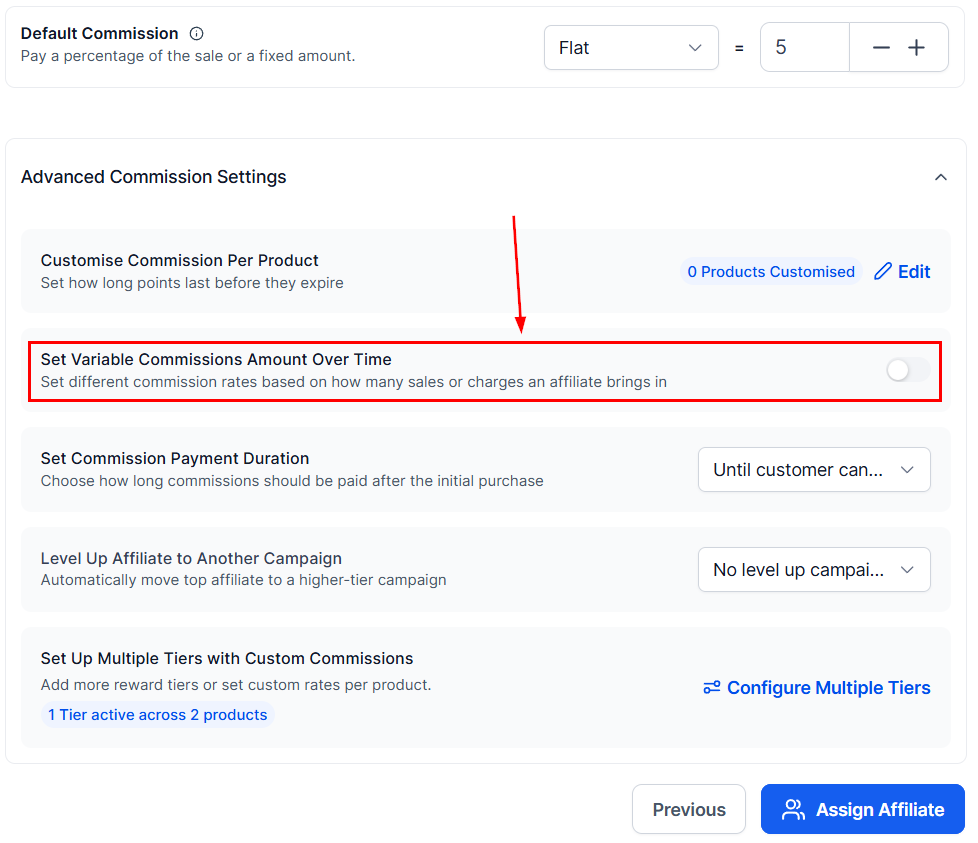
To pay a bonus on early commissions, enable variable commission over time.
<Frame>
  <img src="https://mintcdn.com/fundingmachine-b7281907/2SMOvA86qKqs41So/images/affiliate-manager/setting-up-an-affiliate-campaign/09.png?fit=max&auto=format&n=2SMOvA86qKqs41So&q=85&s=365a566dc467d15093abdb7fbaeabdf6" alt="Advanced Commission Settings in the Affiliate Manager (3)" width="978" height="843" data-path="images/affiliate-manager/setting-up-an-affiliate-campaign/09.png" />
</Frame>

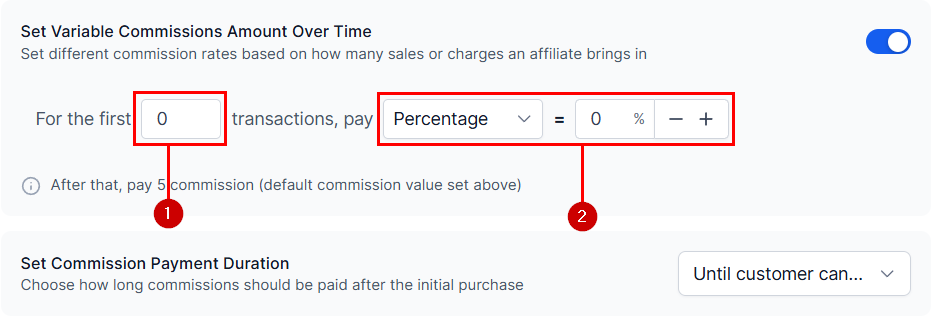
Set the number of transactions (1) and the commission value (2) for the starting bonus.
<Frame>
  <img src="https://mintcdn.com/fundingmachine-b7281907/2SMOvA86qKqs41So/images/affiliate-manager/setting-up-an-affiliate-campaign/10.png?fit=max&auto=format&n=2SMOvA86qKqs41So&q=85&s=003871dd4419adb57ecbf041fa21acb5" alt="Advanced Commission Settings in the Affiliate Manager (4)" width="944" height="329" data-path="images/affiliate-manager/setting-up-an-affiliate-campaign/10.png" />
</Frame>

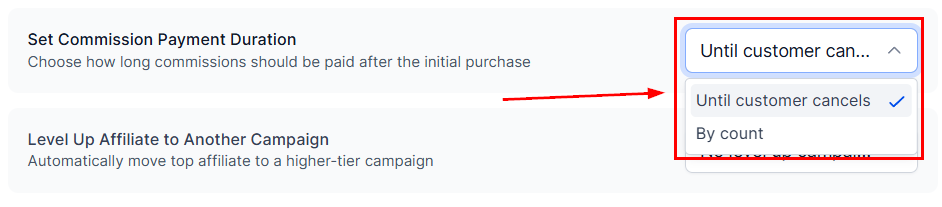
**Set Commission Length** caps how long commissions are paid — see [Commission length](/operators/affiliates/how-to-use-commission-length-variable-commissions-in-affiliate-manager).
<Frame>
  <img src="https://mintcdn.com/fundingmachine-b7281907/2SMOvA86qKqs41So/images/affiliate-manager/setting-up-an-affiliate-campaign/11.png?fit=max&auto=format&n=2SMOvA86qKqs41So&q=85&s=bdf597f605b236f3f673ae923c225071" alt="Advanced Commission Settings in the Affiliate Manager (5)" width="942" height="207" data-path="images/affiliate-manager/setting-up-an-affiliate-campaign/11.png" />
</Frame>

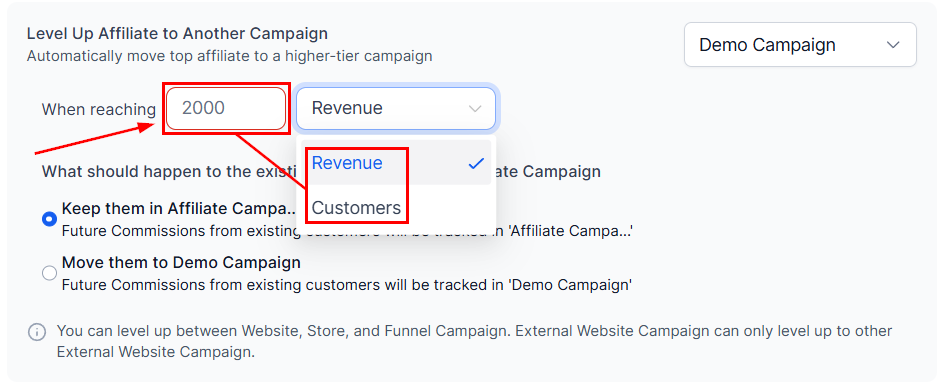
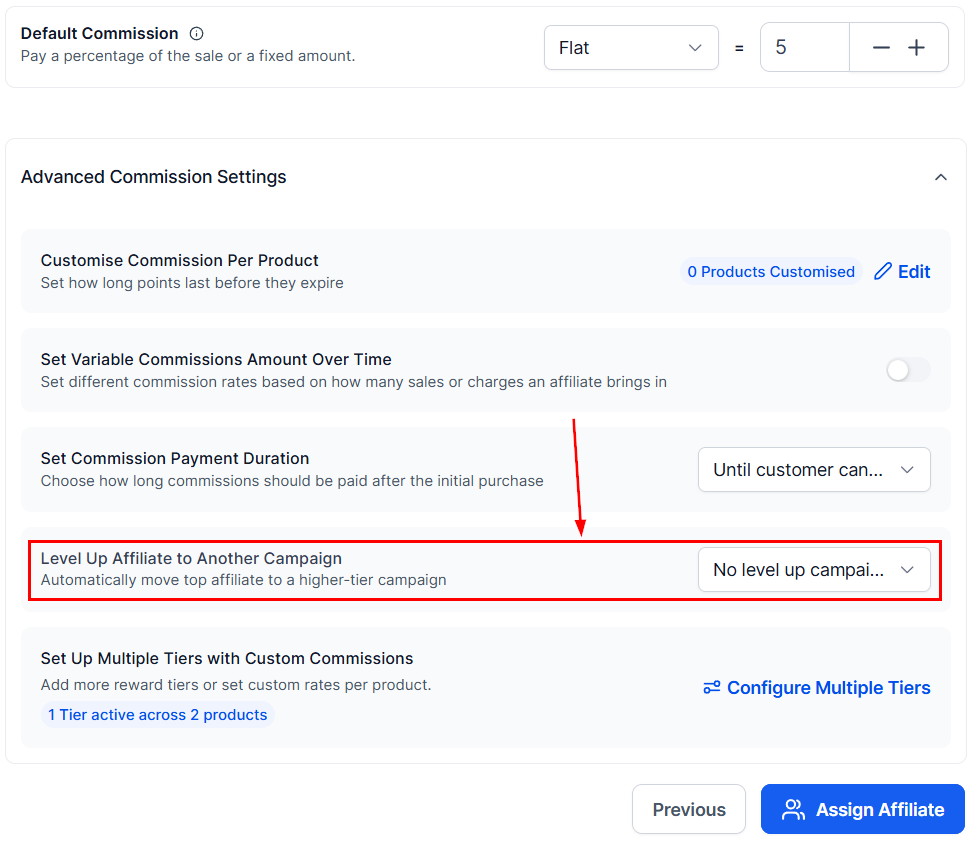
**Level Up to another Campaign** promotes partners to a receiver campaign when they hit a milestone.
<Frame>
  <img src="https://mintcdn.com/fundingmachine-b7281907/2SMOvA86qKqs41So/images/affiliate-manager/setting-up-an-affiliate-campaign/12.png?fit=max&auto=format&n=2SMOvA86qKqs41So&q=85&s=e01eae380dd6526ef4109f3086cbfe7c" alt="Advanced Commission Settings in the Affiliate Manager (6)" width="978" height="843" data-path="images/affiliate-manager/setting-up-an-affiliate-campaign/12.png" />
</Frame>

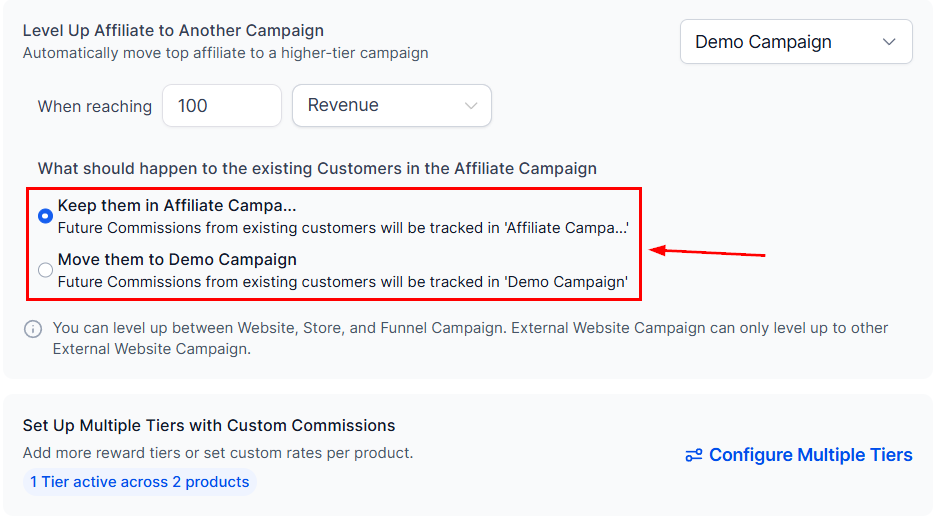
Enter the goal the partner must meet.

<Frame>
  <img src="https://mintcdn.com/fundingmachine-b7281907/2SMOvA86qKqs41So/images/affiliate-manager/setting-up-an-affiliate-campaign/13.png?fit=max&auto=format&n=2SMOvA86qKqs41So&q=85&s=7a96d1e56e825db36d31431349a6e4a2" alt="Advanced Commission Settings in the Affiliate Manager (7)" width="941" height="391" data-path="images/affiliate-manager/setting-up-an-affiliate-campaign/13.png" />
</Frame>

Then pick what happens to their referral customers.
<Frame>
  <img src="https://mintcdn.com/fundingmachine-b7281907/2SMOvA86qKqs41So/images/affiliate-manager/setting-up-an-affiliate-campaign/14.png?fit=max&auto=format&n=2SMOvA86qKqs41So&q=85&s=58fa504ded638bb8c8dd5e8f4f2bec69" alt="Advanced Commission Settings in the Affiliate Manager (8)" width="943" height="523" data-path="images/affiliate-manager/setting-up-an-affiliate-campaign/14.png" />
</Frame>

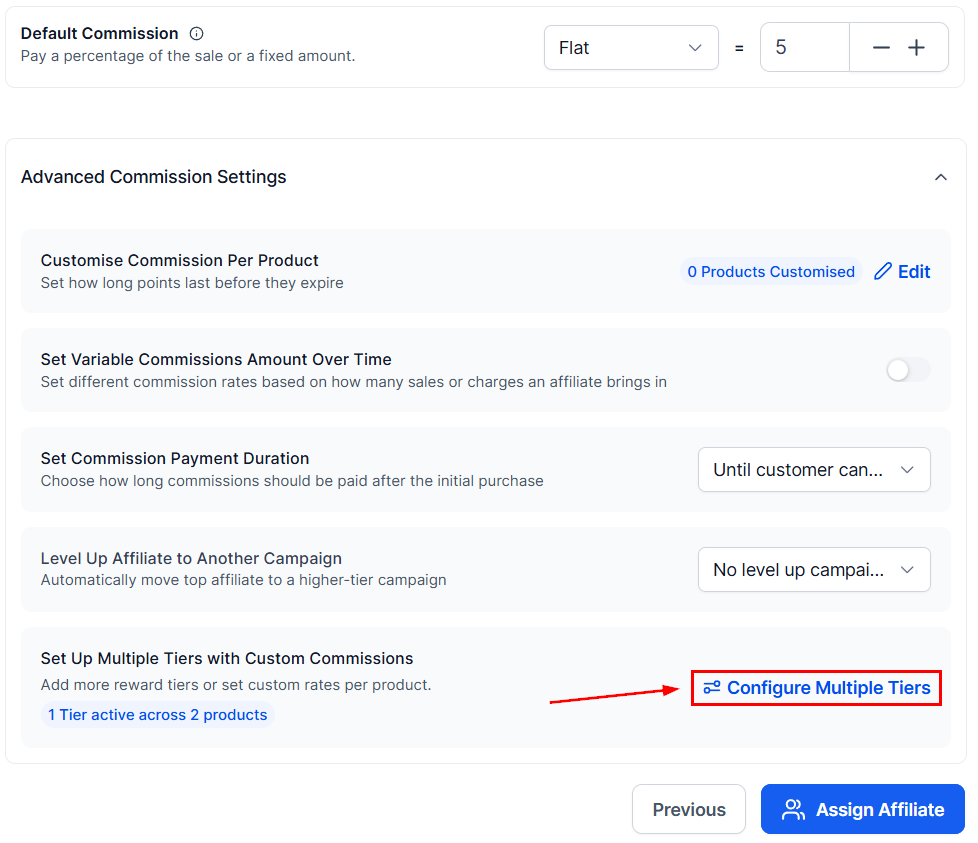
The dials icon sets up commission **tiers** for the same campaign.
<Frame>
  <img src="https://mintcdn.com/fundingmachine-b7281907/2SMOvA86qKqs41So/images/affiliate-manager/setting-up-an-affiliate-campaign/15.png?fit=max&auto=format&n=2SMOvA86qKqs41So&q=85&s=aadb75b85410fa78be0c9362b68e5754" alt="Advanced Commission Settings in the Affiliate Manager (9)" width="978" height="843" data-path="images/affiliate-manager/setting-up-an-affiliate-campaign/15.png" />
</Frame>

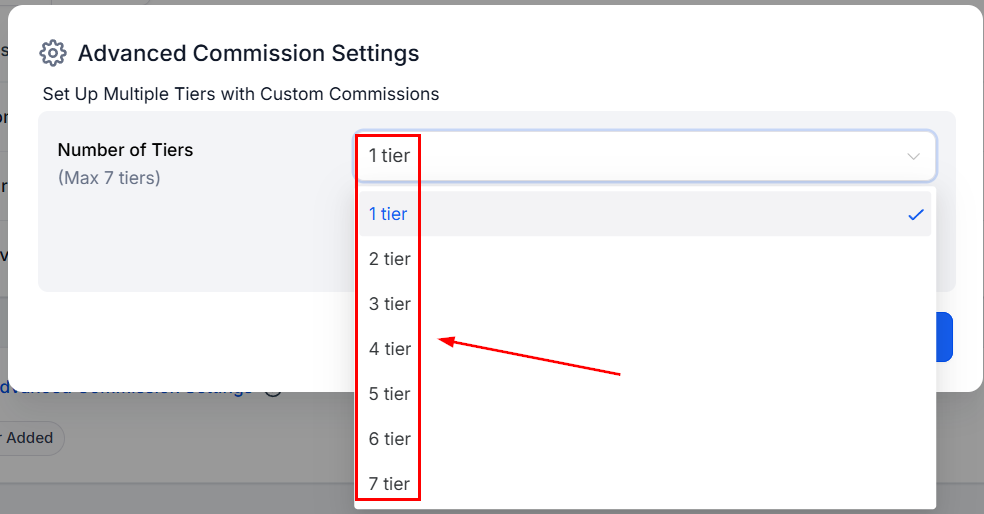
Tiers divide partners into different earning levels — see [Multi-tier commissions](/operators/affiliates/how-to-setup-multi-tier-commissions-for-your-affiliate-campaigns).
<Frame>
  <img src="https://mintcdn.com/fundingmachine-b7281907/2SMOvA86qKqs41So/images/affiliate-manager/setting-up-an-affiliate-campaign/16.png?fit=max&auto=format&n=2SMOvA86qKqs41So&q=85&s=c7832879a0290268710e26a4660eb9db" alt="Advanced Commission Settings in the Affiliate Manager (10)" width="984" height="514" data-path="images/affiliate-manager/setting-up-an-affiliate-campaign/16.png" />
</Frame>

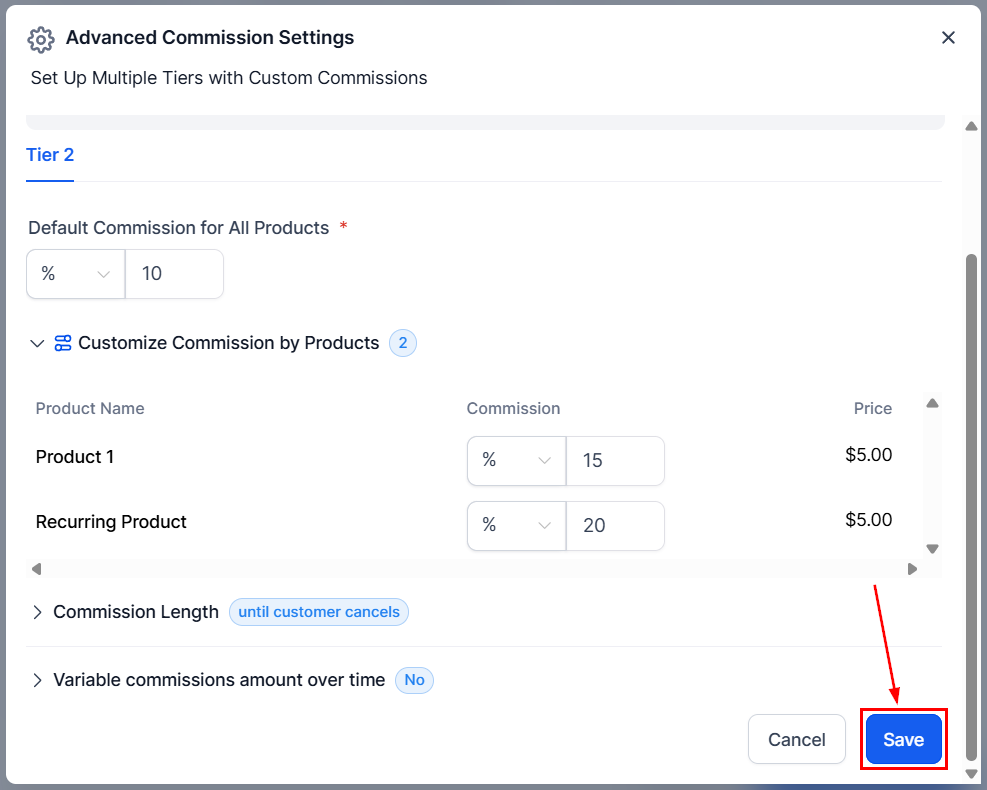
Click **Save** once the tiers are set.
<Frame>
  <img src="https://mintcdn.com/fundingmachine-b7281907/2SMOvA86qKqs41So/images/affiliate-manager/setting-up-an-affiliate-campaign/17.png?fit=max&auto=format&n=2SMOvA86qKqs41So&q=85&s=68ab4caf3cfa6feb7a3c7844d0c5bd41" alt="Advanced Commission Settings in the Affiliate Manager (11)" width="987" height="790" data-path="images/affiliate-manager/setting-up-an-affiliate-campaign/17.png" />
</Frame>

### Additional Commission Options

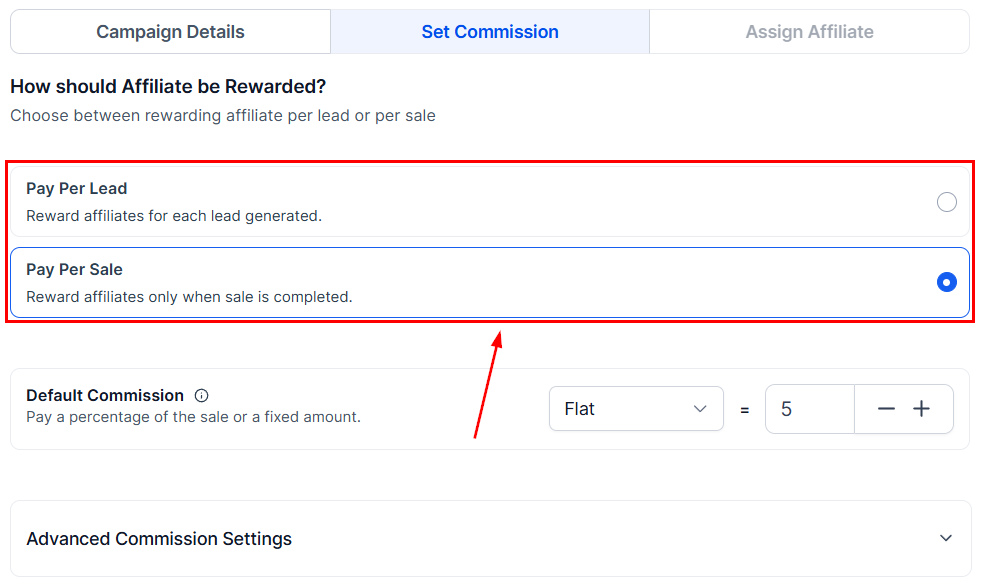
Campaigns sourced from Forms, Surveys, or Calendars choose between [Pay Per Lead](/operators/affiliates/how-to-pay-affiliates-for-lead-generation-using-pay-per-lead) and [Pay Per Sale](/operators/affiliates/how-to-pay-affiliates-for-lead-generation-using-pay-per-sale).
<Frame>
  <img src="https://mintcdn.com/fundingmachine-b7281907/2SMOvA86qKqs41So/images/affiliate-manager/setting-up-an-affiliate-campaign/18.png?fit=max&auto=format&n=2SMOvA86qKqs41So&q=85&s=a8a54f4ba81d6f7c393c7d40d976235c" alt="Additional Commission Options in the Affiliate Manager" width="981" height="585" data-path="images/affiliate-manager/setting-up-an-affiliate-campaign/18.png" />
</Frame>

## Finish

### Campaign Description

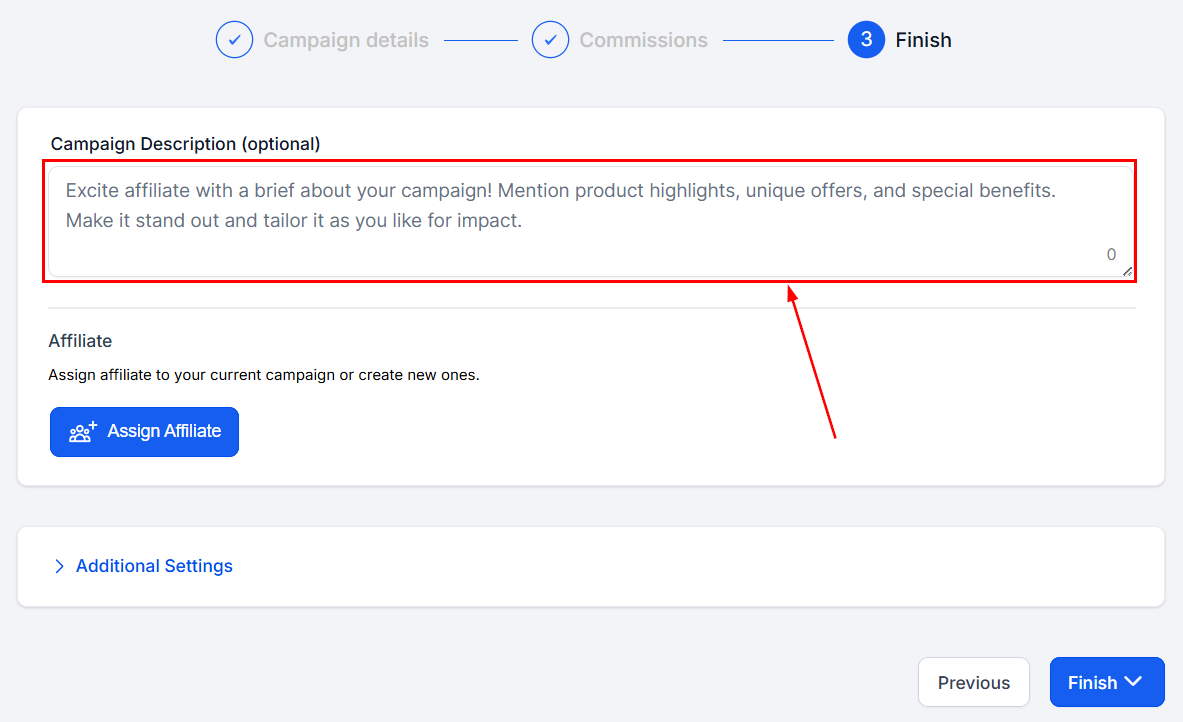
A short overview of the campaign's purpose, shown to partners.
<Frame>
  <img src="https://mintcdn.com/fundingmachine-b7281907/2SMOvA86qKqs41So/images/affiliate-manager/setting-up-an-affiliate-campaign/19.png?fit=max&auto=format&n=2SMOvA86qKqs41So&q=85&s=62d3a50c8c3e7d8ee10a2309256f7da4" alt="Campaign Description in the Affiliate Manager" width="1183" height="722" data-path="images/affiliate-manager/setting-up-an-affiliate-campaign/19.png" />
</Frame>

### Add Affiliate

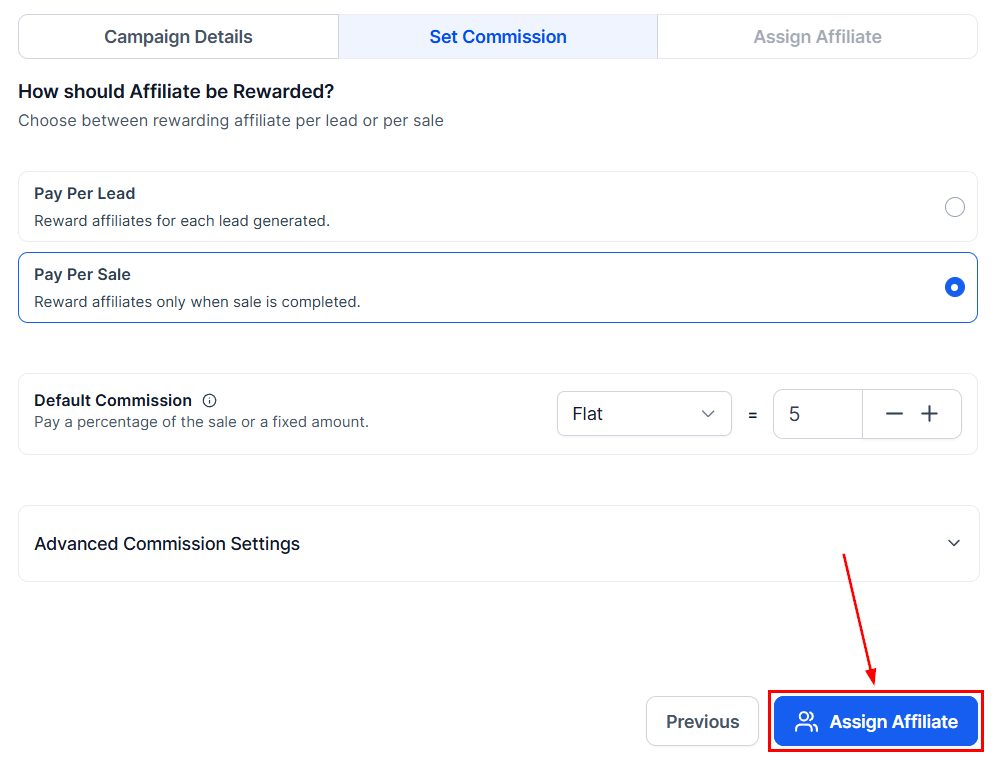
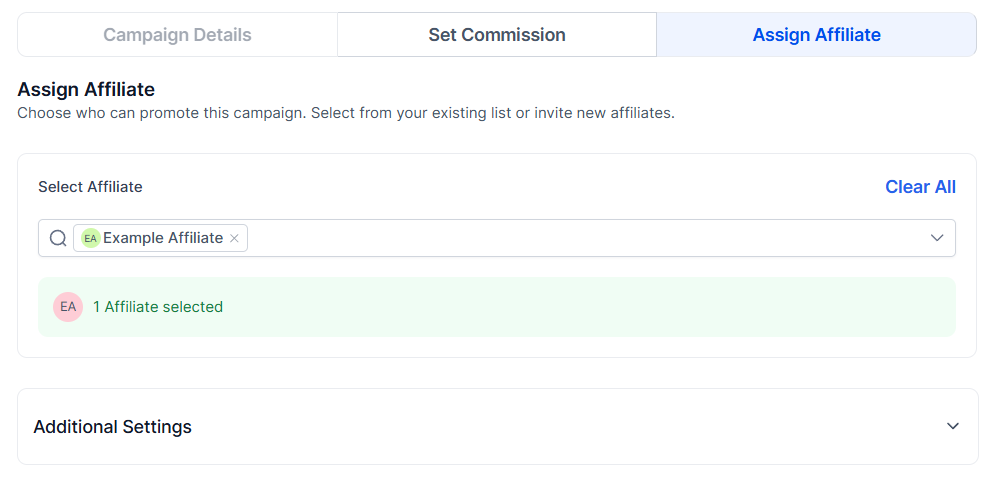
Pick the partners for the campaign. Each gets a unique referral link per campaign, so a partner can be in several campaigns with accurate attribution.
<Frame>
  <img src="https://mintcdn.com/fundingmachine-b7281907/2SMOvA86qKqs41So/images/affiliate-manager/setting-up-an-affiliate-campaign/20.png?fit=max&auto=format&n=2SMOvA86qKqs41So&q=85&s=2b0fbdb23ad8edb27f2269c117461dd9" alt="Add Affiliate in the Affiliate Manager" width="998" height="760" data-path="images/affiliate-manager/setting-up-an-affiliate-campaign/20.png" />
</Frame>

Each campaign a partner joins issues its own referral link.
<Frame>
  <img src="https://mintcdn.com/fundingmachine-b7281907/2SMOvA86qKqs41So/images/affiliate-manager/setting-up-an-affiliate-campaign/21.png?fit=max&auto=format&n=2SMOvA86qKqs41So&q=85&s=98907ba311516e1ef03e940a8ca957fb" alt="Add Affiliate in the Affiliate Manager (2)" width="996" height="482" data-path="images/affiliate-manager/setting-up-an-affiliate-campaign/21.png" />
</Frame>

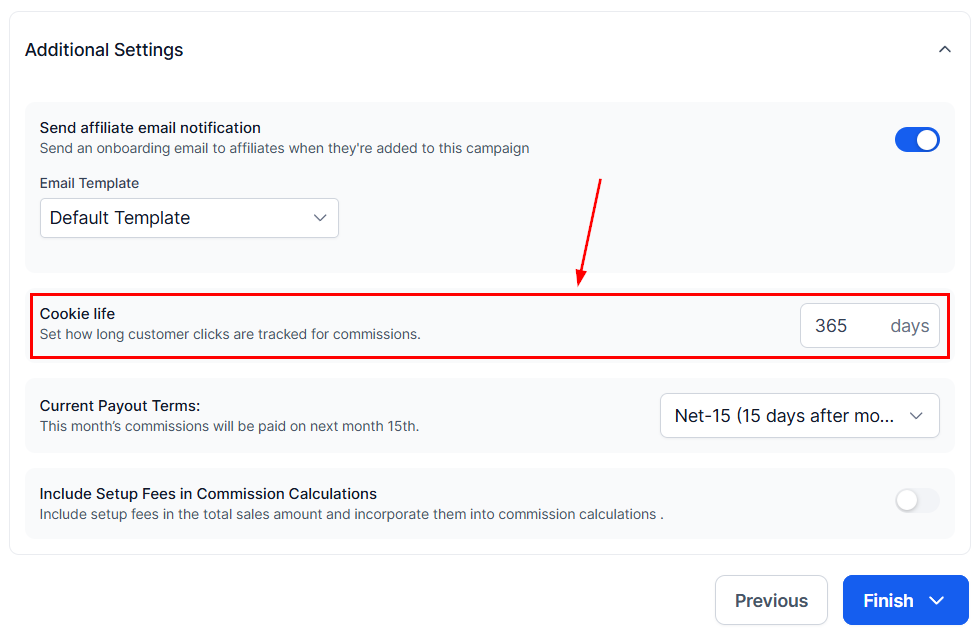
### Cookie Life

How many days the tracking cookie stays active in a lead's browser — the window in which their actions attribute to the partner.
<Frame>
  <img src="https://mintcdn.com/fundingmachine-b7281907/2SMOvA86qKqs41So/images/affiliate-manager/setting-up-an-affiliate-campaign/22.png?fit=max&auto=format&n=2SMOvA86qKqs41So&q=85&s=01e9a25d05babbe11ed608d439312cac" alt="Cookie Life in the Affiliate Manager" width="978" height="634" data-path="images/affiliate-manager/setting-up-an-affiliate-campaign/22.png" />
</Frame>

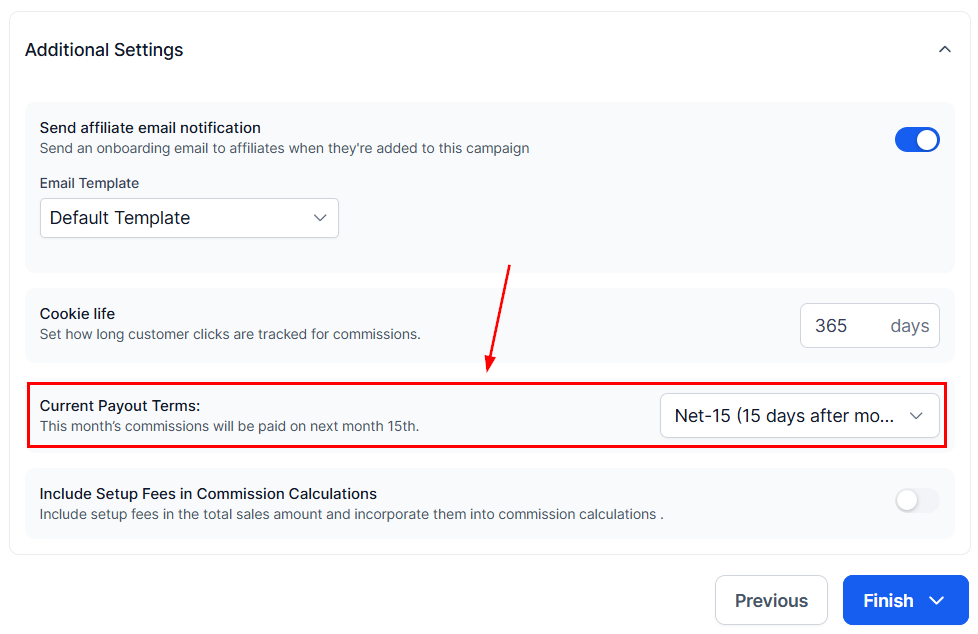
### Payout frequency

The intervals at which partners are paid for their sales.
<Frame>
  <img src="https://mintcdn.com/fundingmachine-b7281907/2SMOvA86qKqs41So/images/affiliate-manager/setting-up-an-affiliate-campaign/23.png?fit=max&auto=format&n=2SMOvA86qKqs41So&q=85&s=50028a3b44f0a0f93374eb0c72768310" alt="Payout frequency in the Affiliate Manager" width="978" height="634" data-path="images/affiliate-manager/setting-up-an-affiliate-campaign/23.png" />
</Frame>

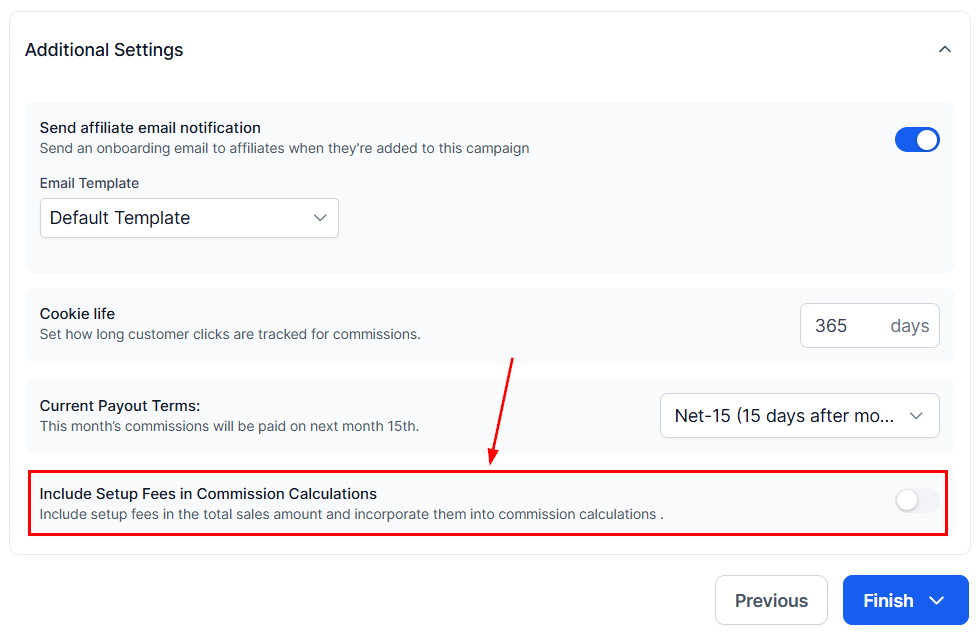
### Set up Fee Additions

Toggle on to include product set-up fees in partner commissions.
<Frame>
  <img src="https://mintcdn.com/fundingmachine-b7281907/2SMOvA86qKqs41So/images/affiliate-manager/setting-up-an-affiliate-campaign/24.png?fit=max&auto=format&n=2SMOvA86qKqs41So&q=85&s=1500e474e11a561436ab02d308db8fb2" alt="Set up Fee Additions in the Affiliate Manager" width="978" height="634" data-path="images/affiliate-manager/setting-up-an-affiliate-campaign/24.png" />
</Frame>

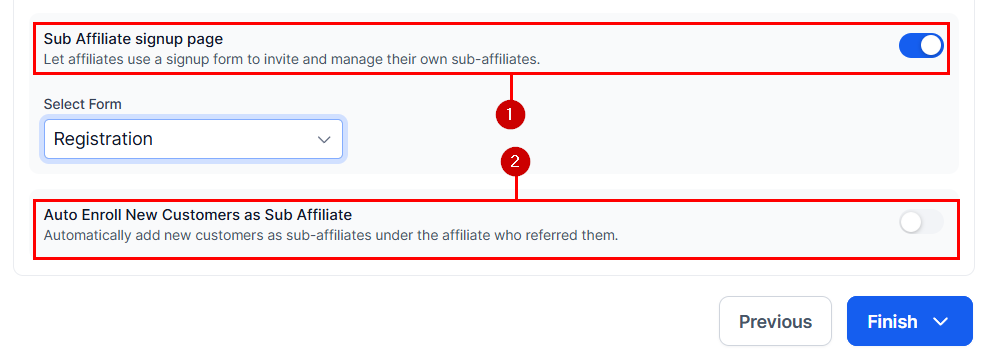
### Sub Affiliate Options

For multi-tier campaigns:

1. **Sub Affiliate signup page** — select a form partners can share to recruit sub-affiliates on their own.
2. **Auto Enroll New Customers as Sub Affiliate** — new customers are automatically enrolled as sub-affiliates under the partner who brought them in.
<Frame>
  <img src="https://mintcdn.com/fundingmachine-b7281907/2SMOvA86qKqs41So/images/affiliate-manager/setting-up-an-affiliate-campaign/25.png?fit=max&auto=format&n=2SMOvA86qKqs41So&q=85&s=ca42bcc1b61bde485ec367e5055b9817" alt="Sub Affiliate Options in the Affiliate Manager" width="983" height="357" data-path="images/affiliate-manager/setting-up-an-affiliate-campaign/25.png" />
</Frame>

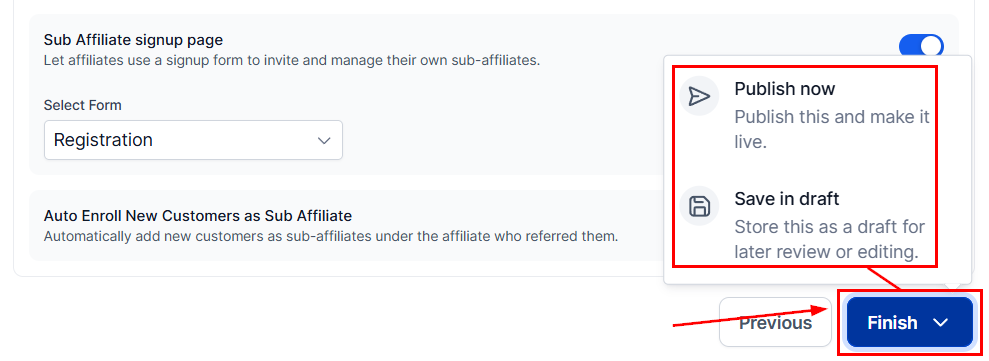
Click **Finish**, then **Publish Now** to go live — or **Save in Draft** to keep the campaign paused.
<Frame>
  <img src="https://mintcdn.com/fundingmachine-b7281907/2SMOvA86qKqs41So/images/affiliate-manager/setting-up-an-affiliate-campaign/26.png?fit=max&auto=format&n=2SMOvA86qKqs41So&q=85&s=cf7198310a64b8f8b9dbbc000725fd01" alt="Sub Affiliate Options in the Affiliate Manager (2)" width="989" height="361" data-path="images/affiliate-manager/setting-up-an-affiliate-campaign/26.png" />
</Frame>