> ## Documentation Index
> Fetch the complete documentation index at: https://docs.myfundingmachine.com/llms.txt
> Use this file to discover all available pages before exploring further.
# Partners Troubleshooting & FAQ
> Fix common Partners page problems: a missing Partners tab, an empty partner list, referrals that never appear, stale totals, and unavailable links.
# Partners Troubleshooting & FAQ
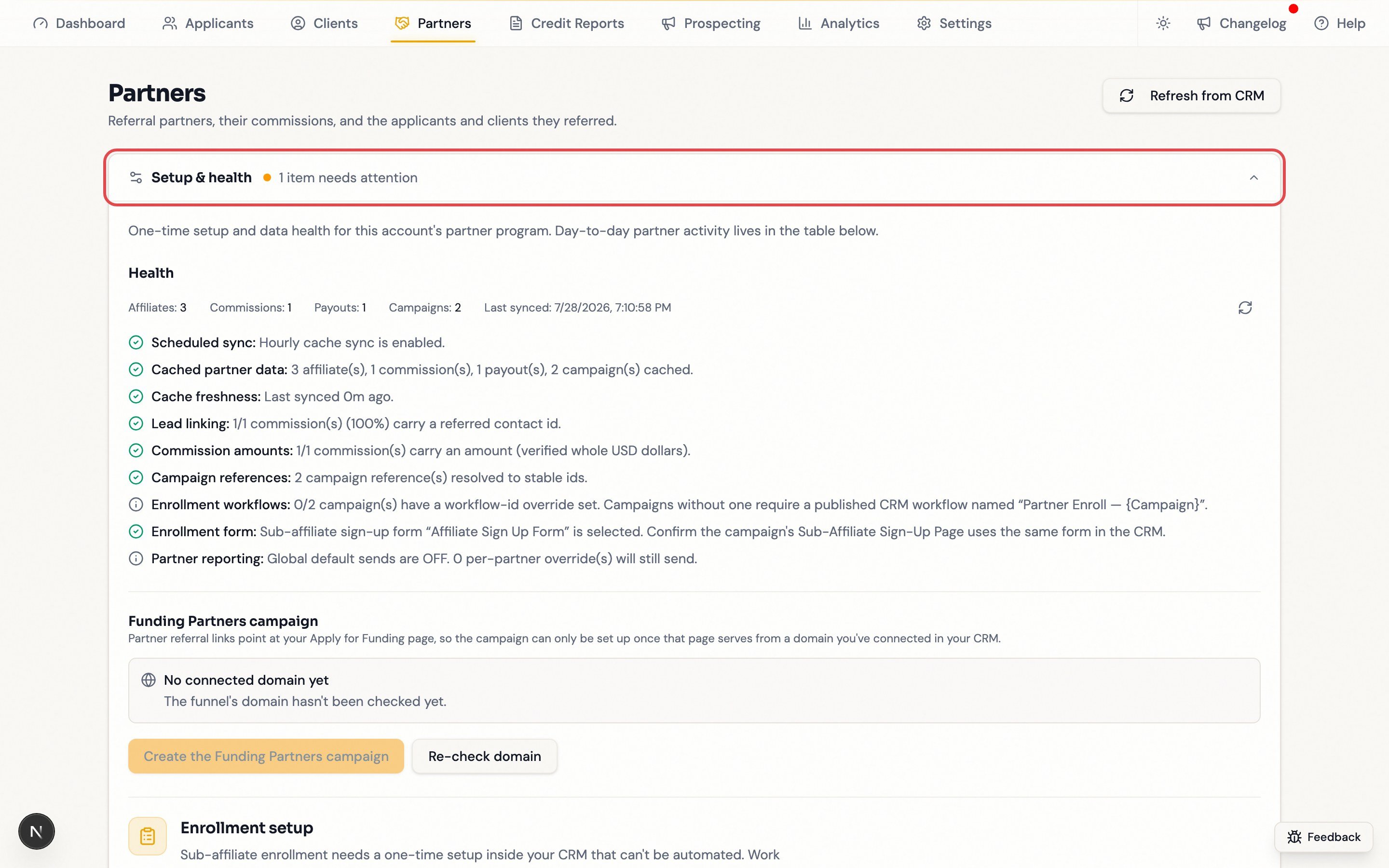
Start with **Setup & health** on the Partners page — it reports the last sync, cached data, and whether commissions carry the link that makes referrals appear, which covers most of what goes wrong. The general pattern: correct the source record in your CRM, then click **Refresh from CRM**.
 ## Quick reference
| Symptom | Likely cause | Fix |
| ---------------------------------------- | ---------------------------------------------------------- | ------------------------------------------------------------------- |
| No **Partners** tab in the navigation | Not enabled for your account | Contact support |
| "No partners synced yet" | Nothing has synced from your CRM | **Refresh from CRM**; if still empty, contact support |
| "No partners yet", no totals or filters | No campaign has synced | Work through [Getting started](/operators/partners/getting-started) |
| Commissions but no applicants or clients | Commissions not linked to contacts | Check **Setup & health → Health → Lead linking** |
| A referred contact is missing | No commission recorded yet | Record the commission in your CRM, refresh |
| Totals look out of date | Sync runs about hourly | **Refresh from CRM** |
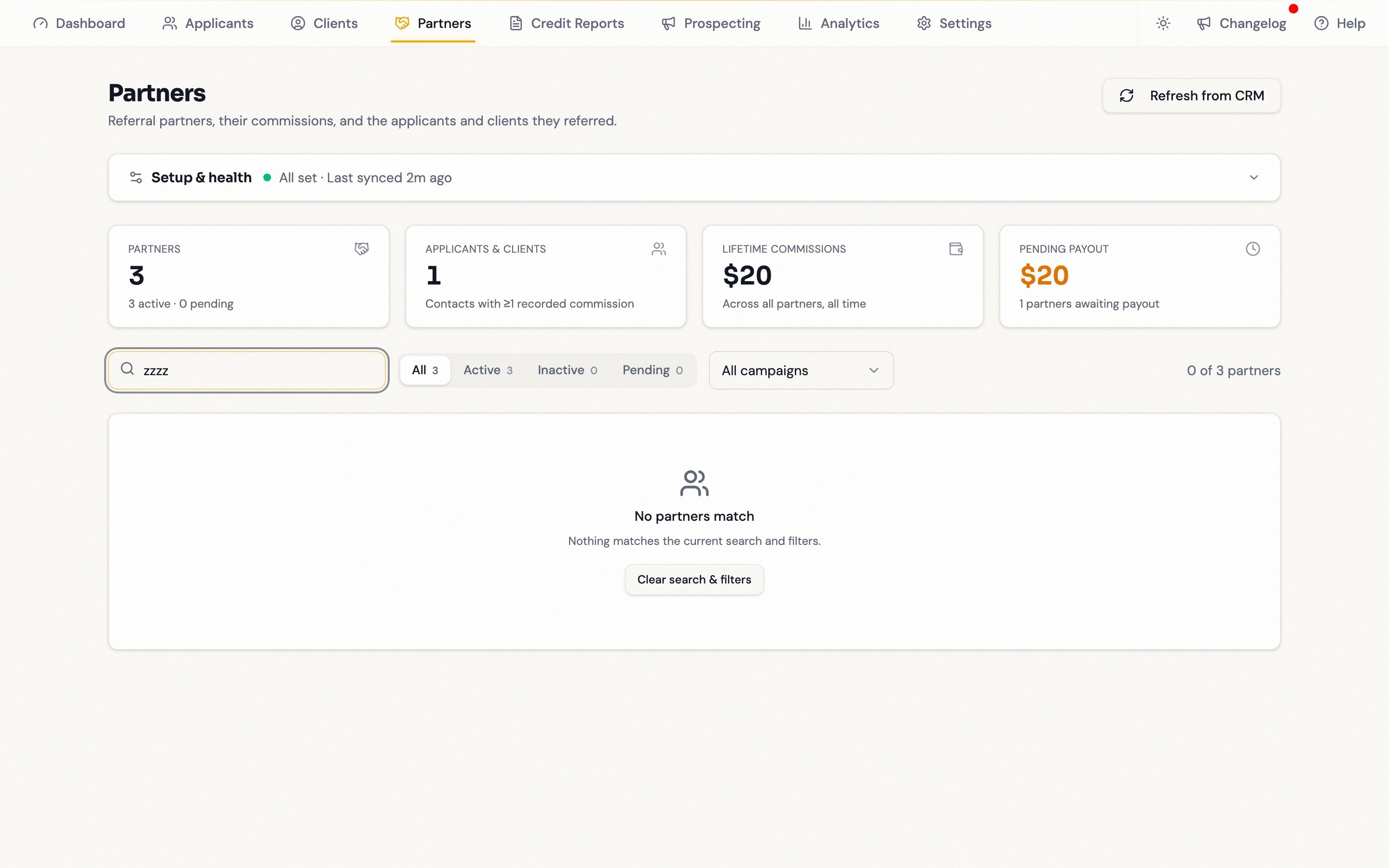
| "No partners match" | Search and filters still applied | **Clear search & filters** |
| Referral link or embed unavailable | **Automate partner signup** incomplete, or code not synced | See [Referral links](/operators/partners/referral-links) |
| Sub-affiliate signup link never works | Campaign has only one tier | Add a second tier (see below) |
| Reports not arriving | No schedule applies, or wrong recipient | See [Partner reports](/operators/partners/partner-reports) |
| Enrollment fails or is greyed out | Workflow or contact link problem | See [Enroll a Partner](/operators/partners/enroll-a-partner) |
## A partner's referrals are missing
The most common report, and usually not a bug:
1. Confirm the lead used the partner's attributed link or form, and the CRM recorded the attribution.
2. Confirm a commission exists in Affiliate Manager. **A referred contact appears only after their first commission record exists** — even if the contact is already in your pipeline. Notes mentioning a partner don't count.
3. **Refresh from CRM**.
4. If **Lead linking** says no cached commission carries a referred contact ID, the problem is account-wide — contact support with your account name and one example partner.
## Other common issues
**A partner is missing.** Confirm they exist as an *affiliate* (not just a contact) and are enrolled in the expected campaign; then clear filters and search, and refresh.
**Nothing matches your filters.** Search, status, and campaign filters stack — click **Clear search & filters**.
## Quick reference
| Symptom | Likely cause | Fix |
| ---------------------------------------- | ---------------------------------------------------------- | ------------------------------------------------------------------- |
| No **Partners** tab in the navigation | Not enabled for your account | Contact support |
| "No partners synced yet" | Nothing has synced from your CRM | **Refresh from CRM**; if still empty, contact support |
| "No partners yet", no totals or filters | No campaign has synced | Work through [Getting started](/operators/partners/getting-started) |
| Commissions but no applicants or clients | Commissions not linked to contacts | Check **Setup & health → Health → Lead linking** |
| A referred contact is missing | No commission recorded yet | Record the commission in your CRM, refresh |
| Totals look out of date | Sync runs about hourly | **Refresh from CRM** |
| "No partners match" | Search and filters still applied | **Clear search & filters** |
| Referral link or embed unavailable | **Automate partner signup** incomplete, or code not synced | See [Referral links](/operators/partners/referral-links) |
| Sub-affiliate signup link never works | Campaign has only one tier | Add a second tier (see below) |
| Reports not arriving | No schedule applies, or wrong recipient | See [Partner reports](/operators/partners/partner-reports) |
| Enrollment fails or is greyed out | Workflow or contact link problem | See [Enroll a Partner](/operators/partners/enroll-a-partner) |
## A partner's referrals are missing
The most common report, and usually not a bug:
1. Confirm the lead used the partner's attributed link or form, and the CRM recorded the attribution.
2. Confirm a commission exists in Affiliate Manager. **A referred contact appears only after their first commission record exists** — even if the contact is already in your pipeline. Notes mentioning a partner don't count.
3. **Refresh from CRM**.
4. If **Lead linking** says no cached commission carries a referred contact ID, the problem is account-wide — contact support with your account name and one example partner.
## Other common issues
**A partner is missing.** Confirm they exist as an *affiliate* (not just a contact) and are enrolled in the expected campaign; then clear filters and search, and refresh.
**Nothing matches your filters.** Search, status, and campaign filters stack — click **Clear search & filters**.
 **Referral link says "Not synced yet".** Open the affiliate in Affiliate Manager, verify a live campaign and referral link exist, refresh. Still missing? Send the affiliate ID and campaign name to support.
**Sub-affiliate signup link never works.** These links only work from tier 2 up, and Funding Machine cannot read your campaign's tiers. In Affiliate Manager, check the campaign's commission settings show 2 or more tiers (up to 7 supported), add one if not, then re-copy the link.
**A client is still listed as an applicant.** Confirm the contact reached the client pipeline or stage and the opportunity is attached to the correct contact, then refresh.
**Commission or pending payout total is wrong.** Verify the commission's amount, status, affiliate, campaign, and referred contact in Affiliate Manager, plus whether a payout was recorded. Correct the source and refresh — never create a duplicate commission to fix an accounting difference.
**A report was not delivered.** Verify the recipient email, which schedule applies, and that your CRM email sender is active; check delivery logs and spam. Then send one manually. Duplicates usually mean a custom schedule plus manual sends.
## FAQ
No — it's internal to your team. Partners get their referral link, sign-up link, and emailed reports; their own performance view is your CRM's affiliate portal.
Both routes start in your CRM, which owns partner records. Send a sign-up link and let your workflow enroll them, or turn an existing contact into an affiliate with **Add → Import from Contacts** in Affiliate Manager. The **Enroll in campaign** control here cannot create partners — it adds an already-synced partner to another campaign.
In your CRM's Affiliate Manager. This page shows paid and pending amounts but does not move money or change statuses.
Roughly hourly, plus whenever anyone clicks **Refresh from CRM**. The collapsed **Setup & health** row shows the last-synced time.
Partners load in batches and per-partner detail shows the first 100 linked contacts, so a `+` marks a floor. Click **Load more partners** to keep loading.
Whole dollars, exactly as your CRM reports them.
They are admin-only: reporting defaults, the **Settings** tab, **Send report**, and the referral-link override.
## Still stuck?
Email [support@myfundingmachine.com](mailto:support@myfundingmachine.com) with your account name, the partner name and affiliate ID, the campaign, the exact page and tab, what you expected versus what appeared, a screenshot, and what **Setup & health** reports.
Never include passwords, API keys, payment details, or unredacted client information.
**Referral link says "Not synced yet".** Open the affiliate in Affiliate Manager, verify a live campaign and referral link exist, refresh. Still missing? Send the affiliate ID and campaign name to support.
**Sub-affiliate signup link never works.** These links only work from tier 2 up, and Funding Machine cannot read your campaign's tiers. In Affiliate Manager, check the campaign's commission settings show 2 or more tiers (up to 7 supported), add one if not, then re-copy the link.
**A client is still listed as an applicant.** Confirm the contact reached the client pipeline or stage and the opportunity is attached to the correct contact, then refresh.
**Commission or pending payout total is wrong.** Verify the commission's amount, status, affiliate, campaign, and referred contact in Affiliate Manager, plus whether a payout was recorded. Correct the source and refresh — never create a duplicate commission to fix an accounting difference.
**A report was not delivered.** Verify the recipient email, which schedule applies, and that your CRM email sender is active; check delivery logs and spam. Then send one manually. Duplicates usually mean a custom schedule plus manual sends.
## FAQ
No — it's internal to your team. Partners get their referral link, sign-up link, and emailed reports; their own performance view is your CRM's affiliate portal.
Both routes start in your CRM, which owns partner records. Send a sign-up link and let your workflow enroll them, or turn an existing contact into an affiliate with **Add → Import from Contacts** in Affiliate Manager. The **Enroll in campaign** control here cannot create partners — it adds an already-synced partner to another campaign.
In your CRM's Affiliate Manager. This page shows paid and pending amounts but does not move money or change statuses.
Roughly hourly, plus whenever anyone clicks **Refresh from CRM**. The collapsed **Setup & health** row shows the last-synced time.
Partners load in batches and per-partner detail shows the first 100 linked contacts, so a `+` marks a floor. Click **Load more partners** to keep loading.
Whole dollars, exactly as your CRM reports them.
They are admin-only: reporting defaults, the **Settings** tab, **Send report**, and the referral-link override.
## Still stuck?
Email [support@myfundingmachine.com](mailto:support@myfundingmachine.com) with your account name, the partner name and affiliate ID, the campaign, the exact page and tab, what you expected versus what appeared, a screenshot, and what **Setup & health** reports.
Never include passwords, API keys, payment details, or unredacted client information.